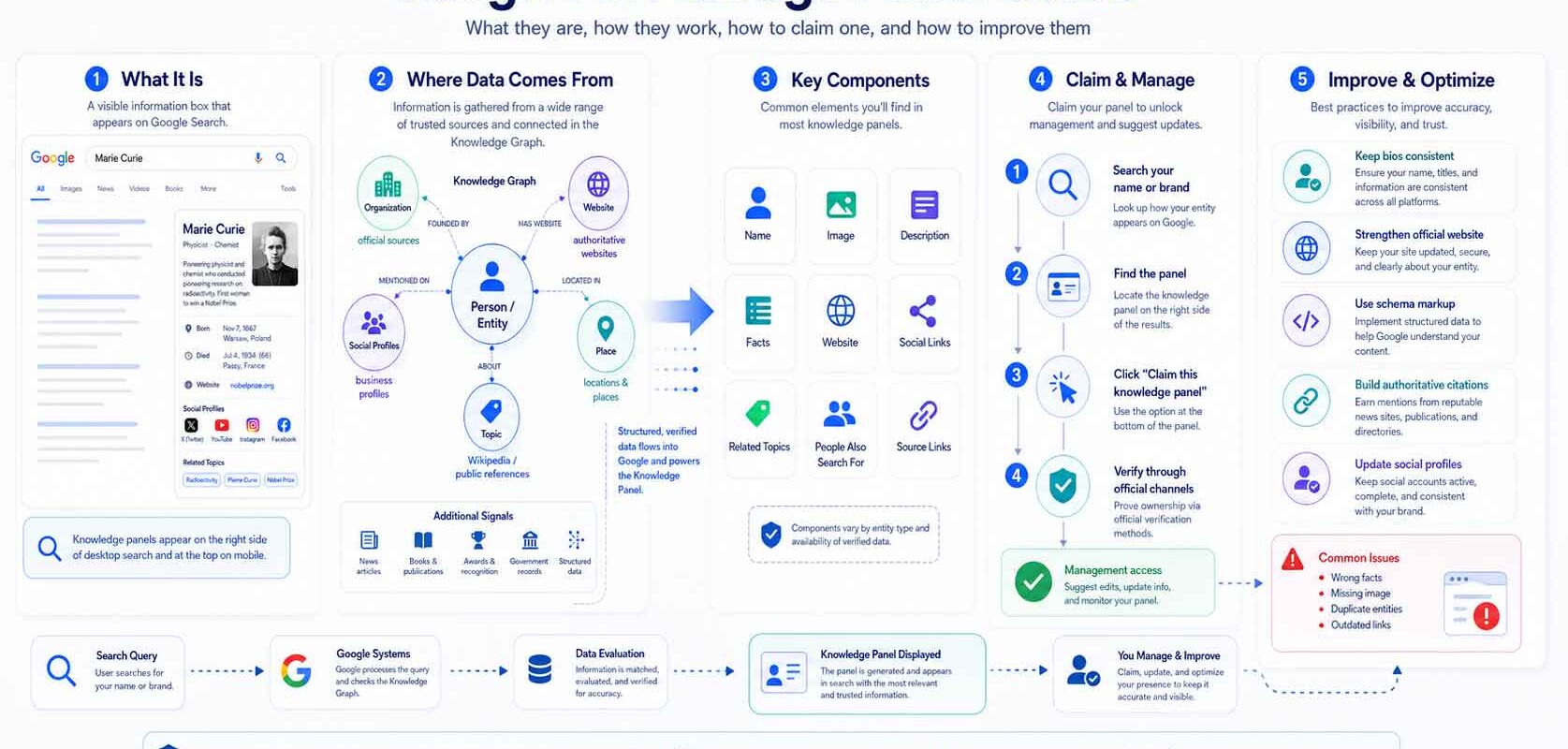
You possibly can’t edit a Google Information Panel straight. You submit urged adjustments, and Google evaluations them and both approves or rejects each. There are two methods to do it: declare and confirm the panel as its topic for a prioritized “Recommend edits” stream, or use the general public “Suggestions” hyperlink that anybody can entry. Some fields, akin to descriptions and subtitles, aren’t straight editable in any respect and have to be corrected at their supply.
This information covers each modifying tracks, declare and confirm your panel, which fields you’ll be able to change versus that are locked, and what to do when nothing updates. Preserve one reframe in thoughts all through: with a Google Information Panel edit, you counsel and Google decides.
What Is a Google Information Panel (and What Does Enhancing Imply)?
A Google Information Panel is an data field that seems in Search outcomes about an individual, group, place, or factor. Google generates these panels robotically from public net data; it doesn’t manually create or delete them, although it does work to maintain the displayed data correct (Google Information Panel Assist).
Panels are powered by the Google Information Graph, a big database of entities and the details that join them. As of Could 2020, Google reported the Information Graph held roughly 500 billion details about 5 billion entities, drawn from many sources together with Wikipedia (Wikipedia: Google Information Graph). To know how the Information Graph and the panel relate to one another as distinct programs, see how the Information Graph differs from the Information Panel.
That adjustments what “modifying” means. As a result of the panel displays what Google’s programs already perceive about an entity, you don’t kind right into a subject. You give Google a corrected truth, with proof, and ask it to replace what it reveals. Generally that goes by way of Google’s suggestions instruments. Generally it means fixing the supply the panel attracts from.
Information Panel vs. Google Enterprise Profile: What’s the Distinction?
A information panel and a Google Enterprise Profile look related in Search however are completely different surfaces, edited by way of completely completely different programs. A Google Enterprise Profile is for companies that serve prospects at a location or service space, and it’s managed straight by way of Google Enterprise Profile (Google Information Panel Assist).
Get a Free Fame Evaluation
Discover out what folks see once they seek for you on-line. No obligation — leads to 24 hours.
| Side | Information Panel | Google Enterprise Profile |
|---|---|---|
| What it’s about | An individual, group, or entity within the Information Graph | A enterprise serving prospects at a location or space |
| The way it’s created | Auto-generated from public net knowledge | Arrange and claimed by the enterprise proprietor |
| The way it’s managed | Recommend edits / Suggestions; repair underlying sources | Instantly by way of Google Enterprise Profile |
| Management degree | Oblique — you counsel, Google decides | Direct — proprietor edits most fields |
A fast take a look at: should you can log in and straight change hours, pictures, and make contact with particulars, you’re working with a Enterprise Profile. Should you can solely counsel adjustments and await evaluation, that’s a information panel — and the remainder of this information is concerning the latter. Unsure which kind of panel applies to your scenario? Understanding private, model, and native information panels breaks down the three primary varieties and the way every is managed.
What Are the Two Methods to Edit a Information Panel?
There are two distinct tracks for altering a information panel, and most confusion comes from blurring them. One is for verified house owners and is prioritized; the opposite is open to anybody however reviewed with out precedence.
Monitor 1: Verified proprietor (“Recommend edits”)
In case you are the topic of the panel or an official consultant, you’ll be able to declare it after which counsel adjustments by way of a verified stream. Verified suggestions is prioritized over nameless submissions — the only greatest cause to assert your panel earlier than making an attempt to appropriate it (Google Information Panel Assist). This observe requires identification verification. For an in depth walkthrough of the declare course of itself, see the step-by-step information to claiming your Google Information Panel.
Monitor 2: Public “Suggestions” hyperlink
Anybody can submit a correction by way of the “Suggestions” hyperlink on the backside proper of a panel. These options are reviewed however not prioritized the best way verified-owner edits are (Google Information Panel Assist). It’s the best path if you don’t personal the panel — flagging a transparent factual error on a panel about another person, for instance — however count on slower, lower-priority dealing with.
How Do You Declare and Confirm Your Information Panel?
Claiming is the prerequisite for the prioritized modifying observe. Open your panel in Search, faucet the menu, and choose “Declare this data panel.” Assessment the data proven, then register to one of many official websites or profiles listed for the entity so Google can affiliate you with it. If Google can’t make that affiliation robotically, you’ll be prompted to supply extra data. Observe that not all panels are claimable (Google Information Panel Assist).
If another person has already claimed the panel, you’ll want to make use of Google’s Account Restoration course of. Google emails the present proprietor and waits three enterprise days for a response; if none arrives, the panel turns into claimable once more (Google Information Panel Assist). For ongoing upkeep when you’re verified, see our information on replace a Google Information Panel.
How Do You Recommend an Edit to a Information Panel?
When you’ve claimed and verified the panel, suggesting an edit is a brief, structured course of. You’re employed from inside Search, signed into the verifying account, and also you’ll want supporting URLs for no matter you wish to change (Google Information Panel Assist). Submitting verified suggestions requires verifying your identification first (Google Information Panel Assist).
The complete sequence — from signing in with the verifying e-mail to watching to your affirmation e-mail — seems within the steps accompanying this information. The core thought: flag a particular truth, describe each the present worth and the corrected worth, and again it with authoritative supply hyperlinks. A single, well-evidenced factual correction strikes quicker than a obscure or promotional request with weak sourcing.
What’s Editable vs. What’s Locked on a Information Panel?
Not each a part of a panel responds to a urged edit. Some fields settle for adjustments with proof; others are derived from sources and might solely be eliminated in slim instances, by no means personalized. The matrix under displays Google’s documented guidelines (Google Information Panel Assist).
| Discipline | Editable? | What you’ll be able to truly do |
|---|---|---|
| Featured picture | Recommend solely | Recommend a direct, publicly accessible picture URL. You possibly can’t take away or reorder associated photographs — typically a source-fix job (see under). |
| Title | Hardly ever | Modified solely with substantial proof that Google’s automated choose wasn’t probably the most consultant. |
| Subtitle | Locked | Google doesn’t settle for or create customized subtitles. |
| Description | Locked (source-derived) | In a roundabout way editable. Repair the underlying supply; with robust proof Google could take away an outline, however received’t create a customized one. |
| Social profiles | Editable | Recommend new profiles or edit current ones — however you’ll be able to’t change their order. |
| “Folks additionally seek for” | Locked | Detachable provided that an entry violates Google coverage; can’t be personalized or added. |
The sample: social profiles, and — with robust proof — titles and featured photographs can transfer by way of the Suggestions stream. Descriptions, subtitles, and “Folks additionally seek for” are ruled by what Google’s programs already imagine. For these, the lever isn’t the Suggestions kind. It’s the supply.
How Do You Repair Locked Fields on the Supply (Wikipedia, Wikidata & Schema)?
When a subject is locked or source-derived, the one sturdy repair is to alter the information Google attracts from and await it to propagate. Panel knowledge comes from the Information Graph, which Google builds from sources together with Wikipedia and Wikidata (Wikipedia: Google Information Graph). The sensible transfer is to make the authoritative, structured information about an entity correct and nicely supported (Google Information Panel Assist). It’s price noting that Google Information Panels draw from many sources past Wikipedia alone — making constant, correct structured knowledge throughout a number of platforms particularly vital.
The featured picture is an efficient instance, because it isn’t straight editable by way of the Suggestions stream. In a single case, Fame X helped a consumer whose panel displayed a picture they didn’t need representing them. Moderately than submitting a direct edit request, the crew improved the topic’s Wikipedia article to incorporate a correct headshot and added a number of photographs of the topic to Wikimedia Commons — the structured sources Google’s entity programs draw from. Google subsequently started utilizing these photographs within the panel. A outcome like this isn’t assured, however it reveals why supply high quality issues a lot for fields you’ll be able to’t edit straight. (Fame X)
The identical logic applies to descriptions and different source-derived details: appropriate the underlying Wikipedia or Wikidata entry (with correct citations), or strengthen structured knowledge akin to schema.org markup and sameAs hyperlinks on properties you management, then wait. A Wikipedia web page strengthens your panel exactly as a result of it provides Google a well-structured, citable major supply — however provided that the entry is well-cited itself. Propagation isn’t prompt, and it isn’t promised — however it’s the route Google’s personal steering factors to for details you’ll be able to’t change contained in the panel.
Why Can’t I Edit My Information Panel? (Troubleshooting)
Why did my information panel disappear?
Information panels are generated robotically, and Google’s programs can add or take away them as its confidence within the underlying public data adjustments — a panel can disappear if the sources it was constructed from weaken, battle, or are eliminated. You possibly can’t power it again straight; the repair is to revive robust, constant, authoritative details about the entity throughout the net (and proper it on the supply) so Google’s programs can re-establish the panel. Per Google’s documentation, a panel’s look and disappearance are decided by automated programs primarily based on relevance.
Should you don’t see a “Recommend edits” possibility or the verified Suggestions stream, the standard trigger is an account or recognition drawback, not a bug. Both you’re not signed in with the account that verified the panel, or Google doesn’t but acknowledge you as a verified consultant (Google Information Panel Assist).
Run by way of this guidelines earlier than assuming one thing is damaged:
- Improper account: Verify you’re logged into the precise Google account tied to the official website or profile you used to assert the panel.
- Declare not accomplished: Should you by no means completed the claim-and-verify course of, the prioritized edit possibility received’t seem. Begin with claiming.
- Panel isn’t claimable: Not all panels could be claimed; if Google can’t affiliate you with an official property, the choice received’t floor.
- Claimed by another person: Use Account Restoration and wait the three enterprise days Google permits the present proprietor to reply.
When edits undergo the stream however get rejected, the most typical cause is sourcing: the URLs you submitted didn’t independently and clearly corroborate the change. Strengthening the proof earlier than resubmitting often does greater than resubmitting the identical request. For a broader have a look at the methods that transfer a panel in the best course, see change a Google Information Panel for the higher.
How Lengthy Do Information Panel Edits Take?
Google says evaluations usually take days to weeks, and that it evaluations every urged edit individually (Google Information Panel Assist). There’s no official per-field timeline revealed, so deal with any particular day-counts you see elsewhere as estimates, not ensures — a easy social-profile correction and a contested description change received’t essentially transfer on the identical schedule.
Two expectations assist. First, source-fix adjustments (Wikipedia, Wikidata) add their very own propagation lag on prime of any evaluation, as a result of Google has to re-ingest the up to date supply earlier than the panel displays it. Second, no edit is assured to be accepted. Plan corrections as an ongoing course of, not a one-click repair, and prioritize the inaccuracies that matter most.