Have you ever ever heard of Dockerception?
Properly, maintain onto your hat. We’re taking place the rabbit gap.
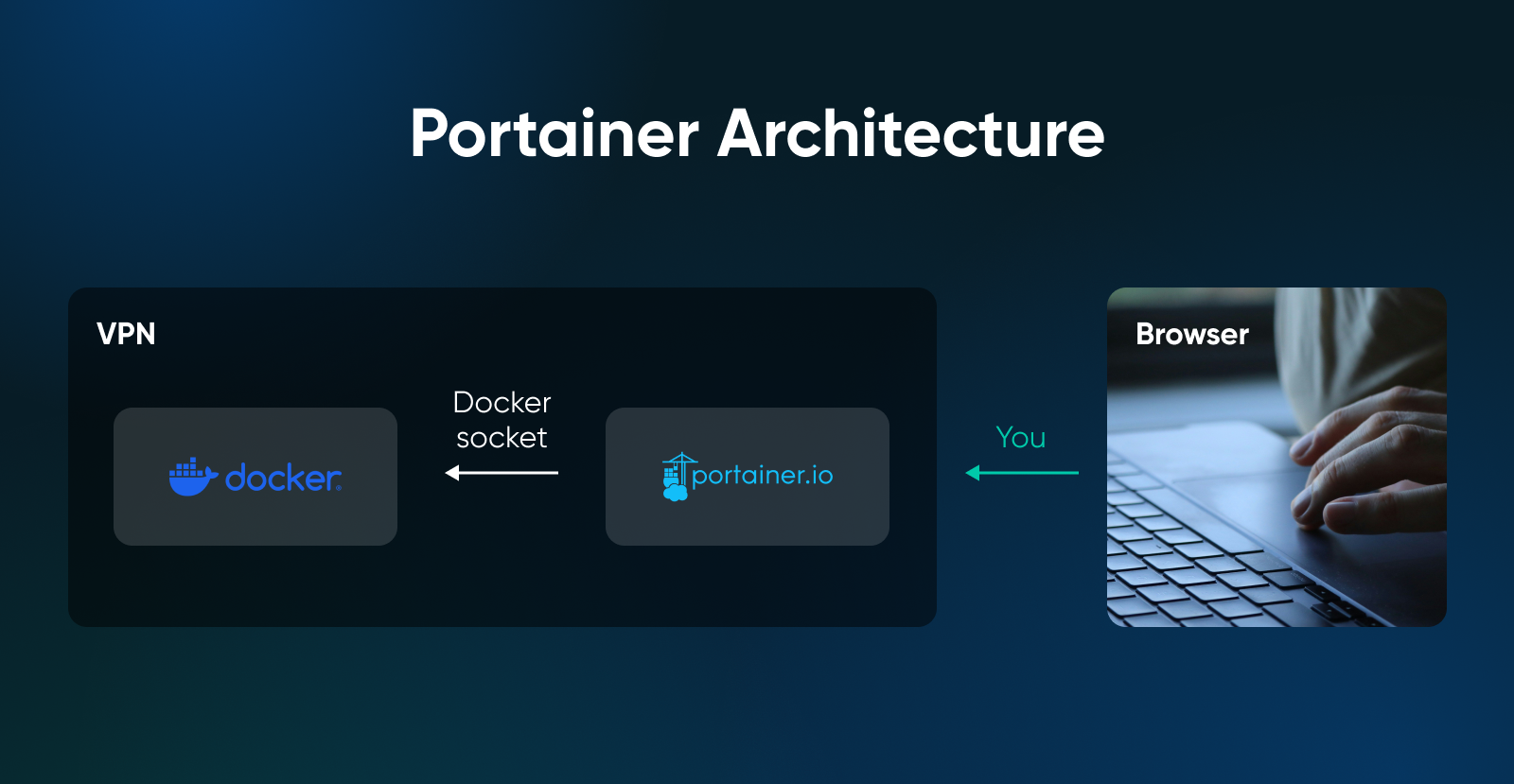
Portainer, the online UI you’re about to put in on high of Docker, is itself a Docker container.
It’s a device that runs on the very factor it manages. You spin it up with one docker run line, and the very first thing it does is attain again via a small gap within the host (a socket file) and ask the Docker daemon to indicate it each different container, together with itself. From inside that browser tab, you’ll be able to replace Portainer. Restart Portainer. And handle your whole different Docker containers.
The UI you’re observing is one click on away from eradicating the UI you’re observing.
On a VPS the place you’re already paying for the field and already snug with SSH, Portainer slots in cleanly on high of Docker with out altering how something beneath works.
That’s the worth.
A 4 GB field runs Docker, Portainer, and a small fleet of self-hosted apps with out breaking a sweat. And it lands round the price of a few streaming subscriptions a month. Sufficient to run the house automation, the household picture retailer, the AI assistant, and the publication you’ve been threatening to launch — on one server you truly personal.
Right here’s easy methods to get it operating, lock it down, and begin seeing worth.
What Is Portainer, Precisely?
Portainer is an internet UI that runs as a Docker container and manages your different containers via the Docker socket.
It’s basically a browser-based entrance finish for a similar Docker instructions you’d in any other case sort by hand, plus stack administration, role-based entry (when you improve), and a dashboard view of CPU and reminiscence.
The socket connection is what makes it work. The bind seems to be like -v /var/run/docker.sock:/var/run/docker.sock within the set up command, and that one line is doing all of the heavy lifting. With out it, Portainer is a UI for an empty Docker host. With it, Portainer is the Docker host’s distant management.
One factor to remember: any course of that may attain /var/run/docker.sock can successfully run something as root on the host. That’s a function when it’s Portainer doing the asking and a downside when it’s some container you spun up final week and forgot you’d given socket entry to.
Deal with the socket bind as a privileged functionality, and audit each different container that wishes one.
Do You Want Portainer If You Already Have Docker?
Nope. Docker works high-quality from the terminal, and loads of individuals run a few containers for years with out ever putting in a UI on high.
You need Portainer if:
- You’ll juggle greater than two or three Docker containers throughout totally different apps.
- You’d moderately click on “restart” than retype a Compose command at 11 pm.
- You’re sharing entry with somebody who doesn’t reside in a terminal.
- You need to deploy stack updates from a Git repo with out writing a deploy script.
Skip Portainer if:
- You’re operating one or two containers that hardly ever change.
- You’re already snug with Docker Compose, and also you’re blissful to remain there.
Docker itself is mainstream sufficient that this isn’t a fringe determination. In line with the 2025 Stack Overflow Developer Survey, Docker is essentially the most extensively adopted container platform amongst builders at over 70% utilization — the most important single-year bounce of any expertise the survey tracks. The Portainer challenge has roughly 37,000 stars on GitHub.
Different choices exist. Coolify pushes additional towards PaaS-style abstractions, and Dokploy lands in related territory with a lighter footprint — however Portainer is the one most set up guides attain for first.
In the event you reside in tmux and run one app, shut this tab. You’re high-quality. In the event you’re operating 4 self-hosted apps and also you’ve googled, “What are Docker logs once more?” twice this month, hold studying.
How Huge a VPS Do You Want To Run Docker and Portainer?
A 4 GB VPS handles Portainer plus a small stack of side-project containers comfortably.
Portainer recommends a number with a minimum of 2 GB of RAM and 1 CPU core, although the Portainer Server course of itself idles round 100 MB. The Docker daemon provides a couple of hundred MB of overhead earlier than any of your apps begin.
Right here’s how that maps to actual workloads:
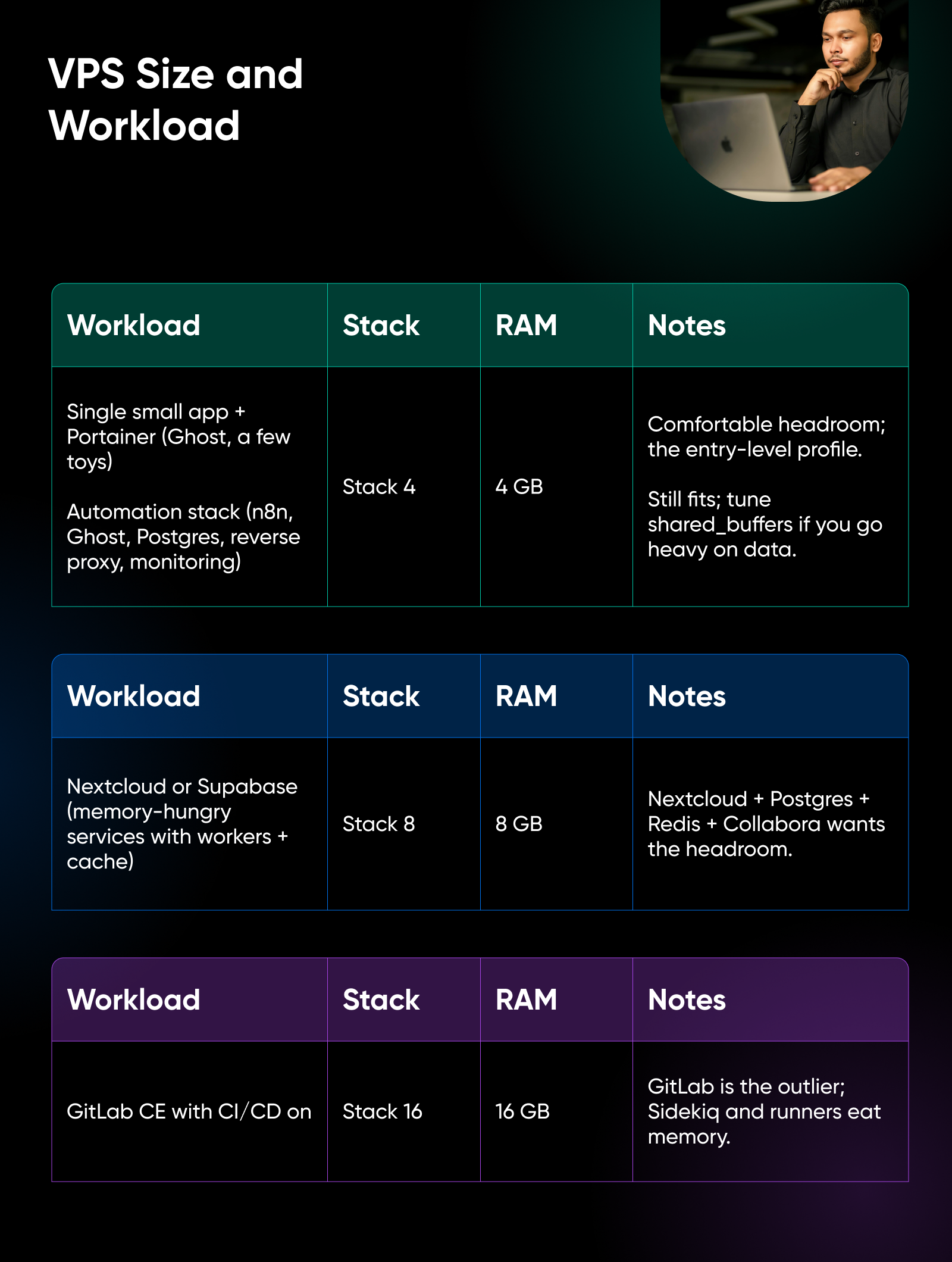
At DreamHost, our Self-Managed VPS affords 4 RAM-based Stack tiers (Stack 4, 8, 16, and 32), with the entry-level Stack 4 sized for precisely this sort of small Docker host. (And yep, NVMe storage and full root entry are included.)
In the event you’re on the fence about whether or not self-hosting is definitely worth the time, Stack 4 is the dimensions the place the maths begins working in your favor on day one.
One observe on storage: Portainer’s storage footprint is minimal — it shops solely its personal configuration database. Portainer’s personal docs advocate SSD-level efficiency (≈3.5 MB/s sustained, 30,000+ IOPS, <10ms write latency), which any trendy NVMe drive clears comfortably. Disk solely turns into an actual concern when you’re operating database-heavy containers like Postgres or MySQL alongside it. In case your VPS is on spinning disk in 2026, the Portainer UI will really feel sluggish lengthy earlier than RAM does. Our recommendation: improve the disk earlier than the plan.
How Do You Set up Docker and Portainer on a VPS?
It takes six steps, and roughly half-hour, most of it ready for picture pulls.
1. Choose a Linux distribution
Ubuntu 22.04 or 24.04 LTS is the trail of least resistance. Ubuntu is what DreamHost’s Self-Managed VPS runs by default, and most Docker set up snippets and neighborhood assist threads assume it. Debian and AlmaLinux work too, although.
Undecided what model of Ubuntu you’re operating? Study 5 methods to test.
2. Set up Docker from the official repository
Don’t apt set up docker.io. That pulls an older Docker from the Ubuntu archive.
As an alternative, use Docker’s personal apt repo per the official Docker set up docs, which provides Docker’s GPG key, the repo, and docker-ce plus the Compose plugin in a single go.
3. Confirm Docker is operating
Run docker run hello-world.
In the event you don’t get the “Hiya from Docker!” message, repair the daemon earlier than layering Portainer on high.
4. Create a persistent quantity for Portainer’s knowledge
Subsequent, run docker quantity create portainer_data.
Retaining Portainer’s database on a Docker quantity (not contained in the container) means a Portainer improve received’t wipe your config.
5. Run Portainer Neighborhood Version
Use the official set up command from Portainer’s Linux set up doc:
  docker run -d
  -p 8000:8000
  -p 9443:9443
  --name portainer
  --restart=at all times
  -v /var/run/docker.sock:/var/run/docker.sock
  -v portainer_data:/knowledge
  portainer/portainer-ce:lts
Let’s break that down line by line:
-druns it indifferent.-p 9443:9443is the Portainer net UI on HTTPS.-p 8000:8000is the Edge Agent tunnel; you solely want it when you’re going to attach distant environments (Docker, Swarm, or Kubernetes) by way of Edge Brokers later, so drop it on a single-host set up.ker hosts later, so drop it on a single-host set up.--restart=at all timesbrings Portainer again up after a reboot.-vflags are the socket bind and the persistent quantity from step 4.:ltstag is Portainer’s Lengthy Time period Assist launch channel — the steady, production-recommended construct.
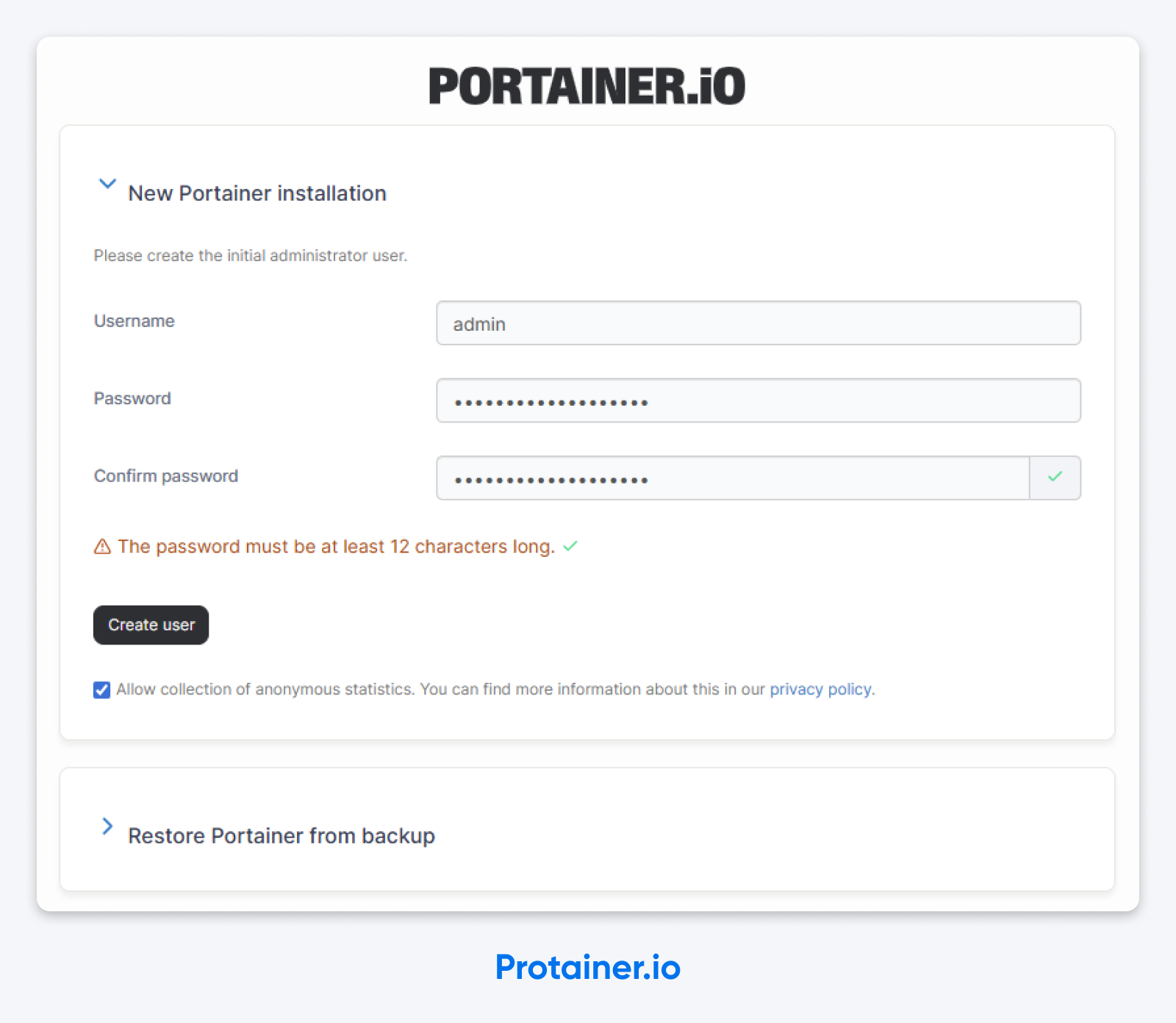
6. Open the UI and create your admin account
Level your browser to https://YOUR_VPS_IP:9443.
Click on via the self-signed cert warning. You’ll land on the “create the preliminary administrator consumer” display screen. Choose a username that isn’t admin, set a powerful password, and reserve it someplace actual. And… you’re in!
Why Did Portainer Simply Time Out on Me?
As a result of Portainer waits precisely 5 minutes for somebody to say it on first set up. If no person does, it locks the door.
Verbatim from Portainer’s personal FAQ:
“As a safety precaution, when Portainer is first put in, it is going to wait for five minutes for an administrator consumer to be created. If a consumer isn’t created inside these 5 minutes, the Portainer Server will cease listening for requests.“
Translation: when you spent Step 5 making a sandwich, your set up is now refusing to speak to you —and also you didn’t do something fallacious.
The repair is easy. Run docker restart portainer.
That spins the container again up, offers you one other five-minute window, and drops you on the create-admin display screen. Repeat as wanted. Welcome to self-hosting.
In the event you’re scripting the set up for a fleet (Ansible, Terraform, a deploy pipeline), Portainer accepts an --admin-password-file flag at startup that bypasses the timer totally by creating the admin consumer from a file at first run. The set up doc covers the syntax. For a one-off VPS set up, the restart trick is ok.
How Do You Cease Docker From Bypassing Your Firewall?
This one surprises individuals in manufacturing, not simply in dev — so pay attention up.
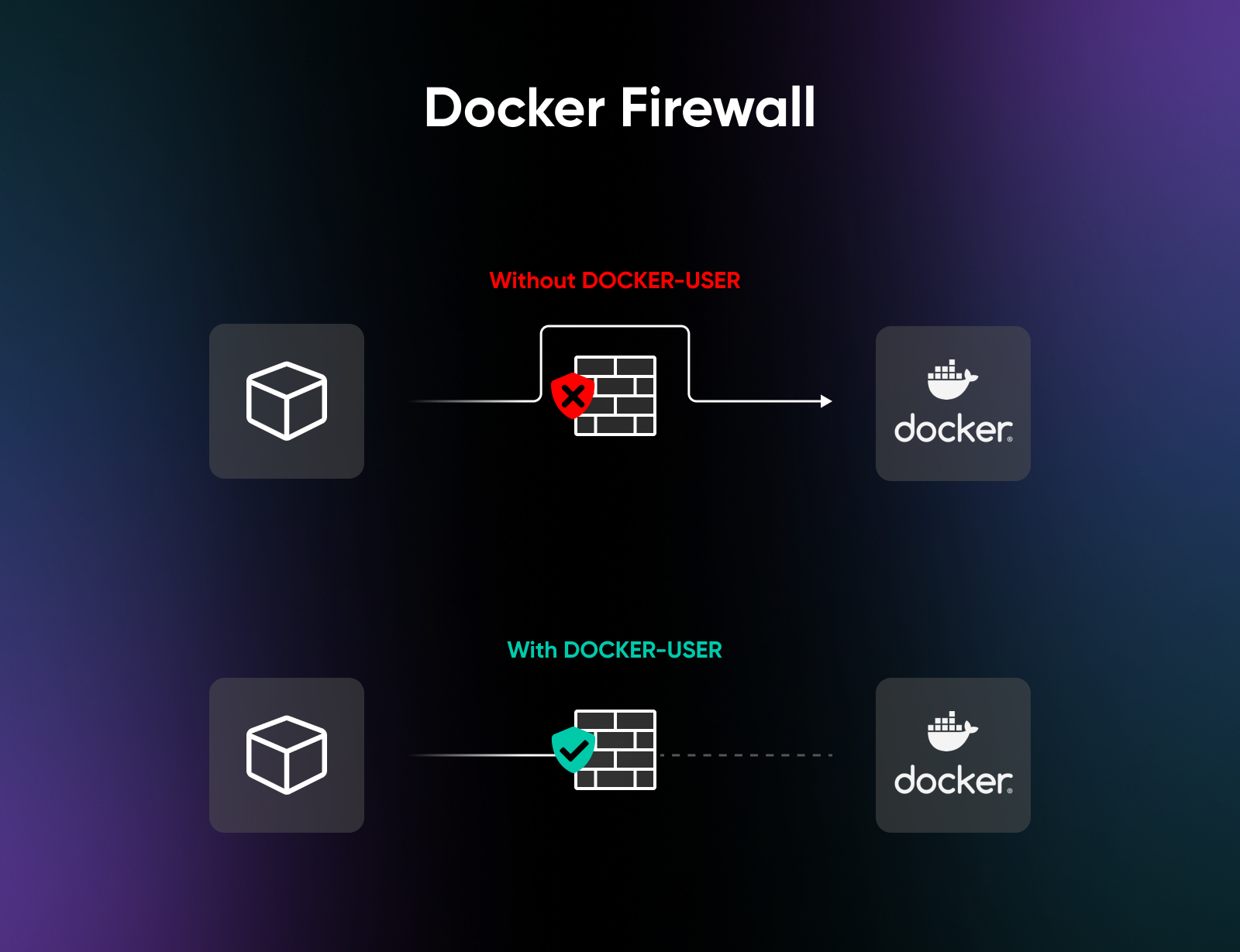
Whenever you docker run -p 80:80, the printed port is reachable from the general public web even when ufw standing exhibits port 80 as denied. Docker routes container site visitors within the NAT desk, which signifies that packets are diverted earlier than they attain the INPUT and OUTPUT chains that UFW makes use of.
UFW isn’t damaged. It’s simply standing within the fallacious hallway.
The repair Docker itself recommends is the DOCKER-USER iptables chain, reserved for administrator guidelines so Docker received’t overwrite them on restart. (The foundations don’t survive a full host reboot on their very own — persist them with iptables-persistent or a systemd service; ufw-docker handles this for you.) The community-standard device for wiring UFW into DOCKER-USER is chaifeng/ufw-docker, which automates the rule technology.
Set up it, then confirm with a port scan from exterior your VPS that the ports you suppose are closed are literally closed.
I’ve watched this catch a pointy engineer twice in the identical week, first on a private field, then on a buyer’s. UFW mentioned one factor, the general public web mentioned one other, and the reality was in iptables.
For Portainer particularly, port 9443 is printed, which suggests the admin UI is reachable from wherever on the general public web the second the container begins. Two affordable paths: prohibit 9443 via DOCKER-USER guidelines (enable solely your house or workplace IP), or entrance it with a VPN tunnel like WireGuard so the UI by no means has a public IP in any respect.
What Ought to You Lock Down Proper After the First Login?
You’re in. 5 issues value doing earlier than you shut that browser tab, per Portainer’s personal safety information:
- Drive HTTPS solely. Portainer ships HTTPS on 9443 by default however doesn’t implement it. Flip the toggle in Settings so the UI refuses HTTP totally.
- Substitute the self-signed certificates. Add a cert you generated, or entrance Portainer with an NGINX reverse proxy holding a Let’s Encrypt certificates. Previous day one, clicking via the browser warning each time is a behavior you’ll remorse.
- Use an actual admin username. “Admin” is the primary guess in any credential-stuffing try. Choose one thing particular to you.
- Limit the UI to a VPN. WireGuard is Portainer’s personal advisable sample. A public 9443 with robust credentials is ok. A 9443 that’s solely reachable on a non-public community is best.
- Audit the Docker socket bind. Something with learn entry to
/var/run/docker.sockcan run something as root on the host. Don’t mount the socket casually into different containers. Each further bind is a brand new path to the host. If a container claims it wants the socket, ask why — and contemplate a socket proxy if the reply is “for monitoring.”
How Do You Really Use Portainer Day-to-Day?
The payoff for putting in Portainer is the day you cease SSH’ing in to restart a misbehaving container, and begin clicking a button as a substitute. The larger payoff is stack administration.
A Portainer stack is a multi-container app outlined by a Docker Compose file. Something you’ll be able to specific as a docker-compose.yml you’ll be able to deploy as a stack, with three principal routes (excluding customized templates) per the official stacks docs:
- Paste Compose into the UI
- Add a Compose file
- Level Portainer at a Git repository
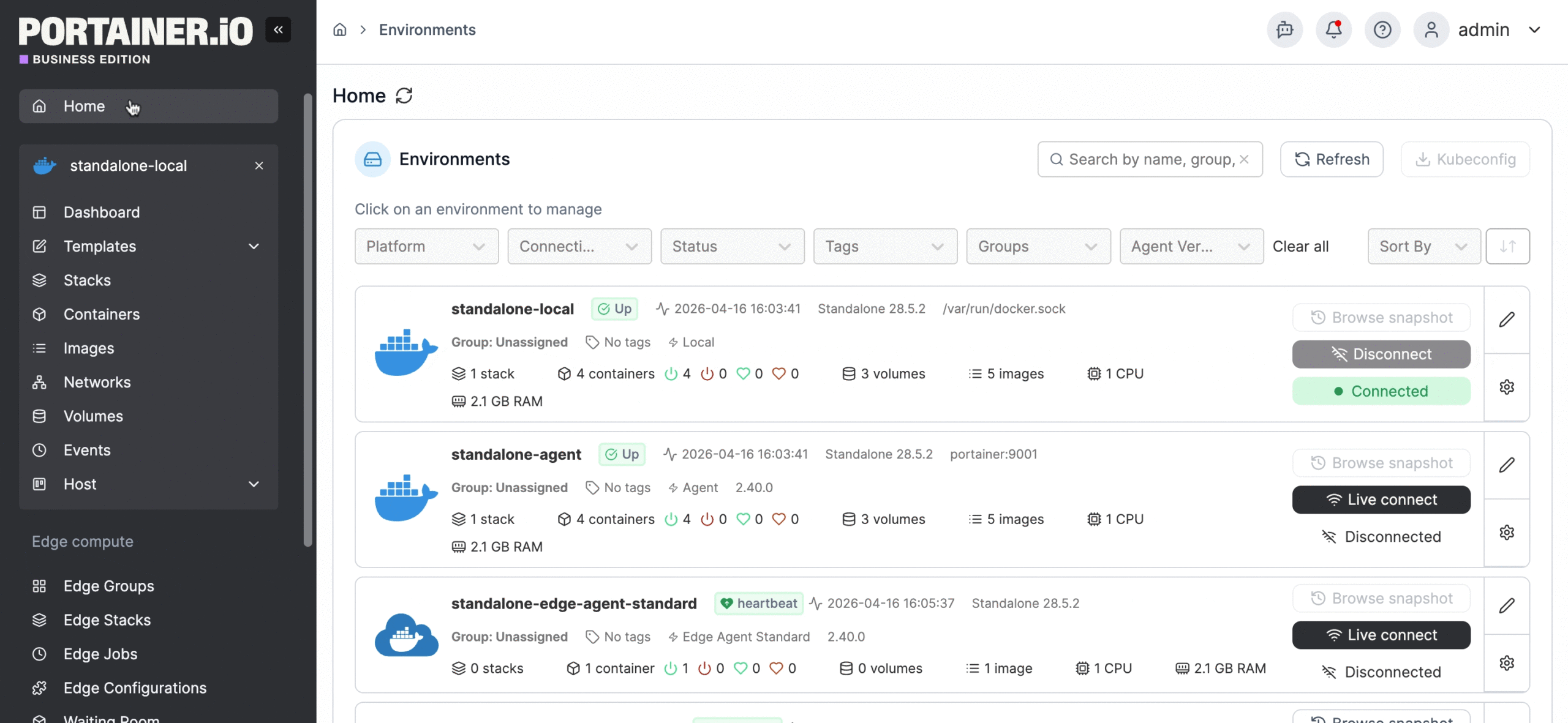
The Git path is the one which issues. You level Portainer at a public or authenticated repo and a path to docker-compose.yml. Portainer both polls the repo on a schedule (the default is 5 minutes) or waits for a webhook from GitHub. When the Compose file modifications upstream, Portainer pulls and redeploys routinely.
That’s the self-hosted model of “deploy on push” with out paying a PaaS for the privilege.
The smaller every day wins add up too. Assume logs in a panel as a substitute of docker logs -f, one-click restarts, rebuilding a stack from a button, and useful resource graphs you’ll be able to scan in three seconds as a substitute of operating Docker stats.
Portainer additionally helps distant Docker hosts via its Edge Agent, which is how a self-hosted AI assistant or media server lands throughout a number of bins.
What Does Portainer Value? (And When Does Free Cease Being Free?)
Portainer Neighborhood Version is free and limitless, interval. The set up you simply walked via is totally featured for one host with as many containers as your VPS can match. No node cap, no expiry, no nag screens.
| Version | Value | Nodes | Finest for |
|---|---|---|---|
| Neighborhood Version | Free, open-source | Limitless | Private initiatives, homelab, single-VPS self-hosters |
| Enterprise Version (Take 3) | Free perpetually | As much as 3 | Small homelabs that need RBAC and audit logs |
| Enterprise Starter | From $99/mo | 5, 10, or 15 | Small groups managing actual infrastructure |
| Enterprise Scale | From $199/mo | As much as 25 | Rising groups needing 9×5 help |
| Enterprise | Quote | Limitless | Compliance and 24/7 wants |
The perpetual free three-node tier (referred to as Take 3) is value understanding about: you renew the license yearly without charge so long as you keep at three nodes or fewer.
That’s the proper plan for many homelabs and small groups who need role-based entry management (RBAC), audit logs, and exercise logging with out paying. Above that, Enterprise Starter is $99/mo on the Portainer enterprise pricing web page for five/10/15 nodes; Scale is $199/mo as much as 25 nodes; and Enterprise is on quote.
For nearly everybody studying this, the only option is Neighborhood Version. It’ll serve a single-VPS self-host for the lifetime of the field. The Enterprise editions solely earn their hold whenever you’re managing actual node counts, want RBAC throughout a workforce, or require business help for compliance.
Ought to You Add Portainer or Skip It?
Right here’s the trustworthy two-sentence reply:
✅ In the event you’re going to share this server, deploy from Git, or run greater than three containers a yr from now, set up Portainer whereas the host is recent and your habits are nonetheless forming round it.
❌ In the event you’re operating one quiet app and also you’re blissful within the terminal, you received’t miss the UI you didn’t set up.
The actual query isn’t Portainer vs. no Portainer. It’s whether or not self-hosting is the proper name for you in any respect — and also you answered that whenever you opened this tab.
A 4 GB VPS, Docker, and Portainer CE get you additional than most individuals count on — an automation stack, a photograph server, a publication platform, and a neighborhood AI assistant — for lower than you’re in all probability paying for 2 streaming providers you barely watch.
That’s not a nasty deal for a field you truly personal.
Steadily Requested Questions About Docker and Portainer
What’s Portainer used for?
Portainer is used for managing Docker, Docker Swarm, and Kubernetes containers via an internet interface. It runs as a Docker container itself, connects to the host’s Docker socket, and provides you a browser view and management floor over each different container on the host —beginning and stopping containers, deploying multi-container stacks, viewing logs, and managing consumer entry with out SSH’ing in.
Do I would like Portainer if I’ve Docker?
No, you don’t want Portainer to make use of Docker. Docker works utterly from the terminal, and lots of self-hosters by no means set up a UI on high.
Portainer earns its hold whenever you’re juggling greater than two or three containers, sharing entry with somebody who doesn’t reside in a terminal, or deploying stack updates from a Git repository. Skip it when you’re operating one or two steady containers and also you’re snug with Docker Compose.
What port does Portainer run on?
Portainer runs on port 9443 by default for HTTPS entry to the online UI, plus port 8000 for the Edge Agent tunnel when you join distant Docker hosts later. Port 8000 is non-compulsory on a single-host set up; you’ll be able to drop the -p 8000:8000 flag from the set up command with out affecting the native UI. The defaults come straight from Portainer’s official Linux set up doc.
How a lot RAM does Portainer want?
Portainer itself idles at round 100 MB earlier than you load the rest. Add a couple of hundred MB for the Docker daemon, after which measurement from there based mostly on what you’re truly operating.
At DreamHost, we measurement our entry-level Self-Managed VPS at 4 GB of RAM for precisely this sort of workload — sufficient headroom for Portainer plus a small stack of side-project containers like Ghost, n8n, a Postgres database, and a reverse proxy.
Is Portainer free?
Sure. Portainer Neighborhood Version is completely free, and Enterprise Version additionally has a perpetual free 3-node tier referred to as Take 3, which renews yearly without charge so long as you keep at three nodes or fewer. Above three nodes, Enterprise pricing begins at $99/mo on the Starter plan per Portainer’s enterprise pricing web page.
What’s the distinction between Portainer CE and Enterprise Version?
Portainer Neighborhood Version is free, open-source, and totally featured for private use.
Enterprise Version provides role-based entry management, audit logs, exercise logging, and business help, and begins at $99/mo for five nodes after the perpetual free 3-node Take 3 tier.
Can Portainer handle a number of Docker hosts?
Sure, Portainer can handle a number of Docker hosts via Edge Brokers, which run on every distant host and ballot the central Portainer Server on the UI port, with port 8000 used to open a safe tunnel again for administration instructions. For single-VPS self-hosters, that is overkill. For anybody operating three or extra bins that share a management aircraft, for this reason 8000 is within the set up line.
Does Docker bypass UFW on a VPS?
Sure, Docker bypasses UFW by default as a result of Docker manages container site visitors on the iptables NAT layer, which sits in entrance of UFW’s INPUT and OUTPUT chains.
Per Docker’s packet-filtering documentation, “Packets are diverted earlier than it reaches the INPUT and OUTPUT chains that UFW makes use of.” The repair is the DOCKER-USER iptables chain, and the community-standard device for wiring UFW into it’s chaifeng/ufw-docker.

Personal Your Whole Stack. Apps, AI, Databases, and Extra.
Maintain each credential and dialog on a server you management, with NVMe pace and unmetered bandwidth in-built.
{
“@context”: “https://schema.org”,
“@graph”: [
{
“@type”: “FAQPage”,
“mainEntity”: [
{
“@type”: “Question”,
“name”: “What is Portainer used for?”,
“acceptedAnswer”: {
“@type”: “Answer”,
“text”: “Portainer is used for managing Docker, Docker Swarm, and Kubernetes containers through a web interface. It runs as a Docker container itself, connects to the host’s Docker socket, and gives you a browser view and control surface over every other container on the host — starting and stopping containers, deploying multi-container stacks, viewing logs, and managing user access without SSH’ing in.”
}
},
{
“@type”: “Question”,
“name”: “Do I need Portainer if I have Docker?”,
“acceptedAnswer”: {
“@type”: “Answer”,
“text”: “No, you don’t need Portainer to use Docker. Docker works completely from the terminal, and many self-hosters never install a UI on top.”
}
},
{
“@type”: “Question”,
“name”: “What port does Portainer run on?”,
“acceptedAnswer”: {
“@type”: “Answer”,
“text”: “Portainer runs on port 9443 by default for HTTPS access to the web UI, plus port 8000 for the Edge Agent tunnel if you connect remote Docker hosts later.”
}
},
{
“@type”: “Question”,
“name”: “How much RAM does Portainer need?”,
“acceptedAnswer”: {
“@type”: “Answer”,
“text”: “Portainer itself idles at around 100 MB before you load anything else. Add a few hundred MB for the Docker daemon, and then size from there based on what you’re actually running.”
}
},
{
“@type”: “Question”,
“name”: “Is Portainer free?”,
“acceptedAnswer”: {
“@type”: “Answer”,
“text”: “Yes. Portainer Community Edition is totally free, and Business Edition also has a perpetual free 3-node tier called Take 3, which renews annually at no cost as long as you stay at three nodes or fewer.”
}
},
{
“@type”: “Question”,
“name”: “What’s the difference between Portainer CE and Business Edition?”,
“acceptedAnswer”: {
“@type”: “Answer”,
“text”: “Portainer Community Edition is free, open-source, and fully featured for personal use. Business Edition adds role-based access control, audit logs, activity logging, and commercial support, and starts at $99/mo for 5 nodes after the perpetual free 3-node Take 3 tier.”
}
},
{
“@type”: “Question”,
“name”: “Can Portainer manage multiple Docker hosts?”,
“acceptedAnswer”: {
“@type”: “Answer”,
“text”: “Yes, Portainer can manage multiple Docker hosts through Edge Agents, which run on each remote host and poll the central Portainer Server on the UI port, with port 8000 used to open a secure tunnel back for management commands.”
}
},
{
“@type”: “Question”,
“name”: “Does Docker bypass UFW on a VPS?”,
“acceptedAnswer”: {
“@type”: “Answer”,
“text”: “Yes, Docker bypasses UFW by default because Docker manages container traffic at the iptables NAT layer, which sits in front of UFW’s INPUT and OUTPUT chains.”
}
}
]
},
{
“@sort”: “HowTo”,
“title”: “Easy methods to Set up Docker and Portainer on a VPS”,
“description”: “Set up Docker and Portainer Neighborhood Version on an Ubuntu VPS in roughly half-hour, from selecting a Linux distribution to creating the admin account.”,
“totalTime”: “PT30M”,
“step”: [
{
“@type”: “HowToStep”,
“position”: 1,
“name”: “Pick a Linux distribution”,
“text”: “Ubuntu 22.04 or 24.04 LTS is the path of least resistance. Ubuntu is what DreamHost’s Self-Managed VPS runs by default, and most Docker install snippets and community help threads assume it. Debian and AlmaLinux work too, though.”
},
{
“@type”: “HowToStep”,
“position”: 2,
“name”: “Install Docker from the official repository”,
“text”: “Don’t apt install docker.io. That pulls an older Docker from the Ubuntu archive. Instead, use Docker’s own apt repo per the official Docker install docs, which adds Docker’s GPG key, the repo, and docker-ce plus the Compose plugin in one go.”
},
{
“@type”: “HowToStep”,
“position”: 3,
“name”: “Verify Docker is running”,
“text”: “Run docker run hello-world. If you don’t get the “Hello from Docker!” message, fix the daemon before layering Portainer on top.”
},
{
“@type”: “HowToStep”,
“position”: 4,
“name”: “Create a persistent volume for Portainer’s data”,
“text”: “Next, run docker volume create portainer_data. Keeping Portainer’s database on a Docker volume (not inside the container) means a Portainer upgrade won’t wipe your config.”
},
{
“@type”: “HowToStep”,
“position”: 5,
“name”: “Run Portainer Community Edition”,
“text”: “Use the official install command from Portainer’s Linux install doc: docker run -d -p 8000:8000 -p 9443:9443 –name portainer –restart=always -v /var/run/docker.sock:/var/run/docker.sock -v portainer_data:/data portainer/portainer-ce:lts. The -d flag runs it detached, -p 9443:9443 is the Portainer web UI on HTTPS, -p 8000:8000 is the Edge Agent tunnel you only need for connecting remote environments later, –restart=always brings Portainer back up after a reboot, the -v flags are the socket bind and the persistent volume from step 4, and the :lts tag is Portainer’s Long Term Support release channel.”
},
{
“@type”: “HowToStep”,
“position”: 6,
“name”: “Open the Portainer UI and create the admin account”,
“text”: “Point your browser to https://YOUR_VPS_IP:9443. Click through the self-signed cert warning. You’ll land on the “create the initial administrator user” screen. Pick a username that isn’t admin, set a strong password, and save it somewhere real. And… you’re in!”
}
]
}
]
}
The put up How To Run Docker and Portainer on a VPS (2026 Information) appeared first on DreamHost Weblog.