Since when does “proudly owning your viewers” imply owing a SaaS firm for each subscriber?
For a publication pulling $5,000 a month in paid subscriptions, Substack’s 10% lower is $6,000 a 12 months — and nearer to $8,000 as soon as Stripe charges stack on high.
In January 2024, Casey Newton’s Platformer left Substack for self-hosted Ghost and mentioned the transfer would save the publication “tens of hundreds of {dollars} a 12 months.”
Self-hosting Ghost is the model of “proudly owning your viewers” you possibly can truly worth. You put in the open-source software program, level your area at it, and the one charges go to your digital personal server (VPS), registrar, and e mail vendor. No platform takes a lower.
What Is Self-Hosted Ghost?
Self-hosted Ghost is the open-source model of the Ghost publishing platform put in on a server you personal and function. It’s the identical software program that powers Ghost(Professional), Ghost’s managed internet hosting service, operating on infrastructure you management.
Ghost is MIT-licensed, lives on GitHub, and has been open supply since launch.
Three deployment paths exist for Ghost:
- Ghost(Professional): Ghost’s official managed internet hosting at $15, $29, or $199 a month for annual subscriptions. In case you go this route, Ghost handles updates, e mail infrastructure, and uptime.
- Self-hosted by yourself VPS: You provision a Linux server, set up Ghost, and run it your self. This information explains the way it works.
- Managed self-hosting through third events: Providers like Pikapods or MagicPages run Ghost for you. They’re cheaper than Ghost(Professional) and require much less work than self-hosting, however you don’t have root entry.
“Self-hosted Ghost” nearly all the time means choice two: Ghost on a VPS you administer.
No platform payment, no member cap, no theme constraints, full database entry.
The trade-off is that you just’ll must restart the service when MySQL crashes after an Ubuntu kernel replace. (Sure, that’s English.)
Why Self-Host Ghost As an alternative of Utilizing Substack or Ghost(Professional)?
Self-hosting Ghost makes monetary sense as soon as paid subscription income crosses roughly $250 a month.
Under that, Substack’s free tier prices nothing absolute, and the ten% chew is small. Above it, Substack’s income share prices greater than a VPS, typically by an element of 5 or extra.
| Platform | Month-to-month value (annual plan) | Income share | Member restrict | Customized area | Customized theme |
|---|---|---|---|---|---|
| Substack | $0 | 10% + Stripe processing charges (~13–16% efficient)* | Limitless | Sure (paid) | No |
| Ghost(Professional) Starter** | $15 (yearly billing) | 0% | 1,000 | Sure | No |
| Ghost(Professional) Writer | $29 (yearly billing) | 0% | 1,000 | Sure | Sure |
| Ghost(Professional) Enterprise | $199 (yearly billing) | 0% | 10,000 | Sure | Sure |
| Self-hosted Ghost | ~$15–$30 | 0% | Limitless | Sure | Sure |
| * ~2.9% + $0.30 per transaction, plus a 0.7% payment for recurring subscriptions** Ghost(Professional) Starter helps free publication subscribers solely. Paid memberships and subscription income require Writer or above. | |||||
Ghost(Professional) tiers come from Ghost’s pricing web page. Substack’s 10% comes from Substack’s assist middle. The “13–16% efficient” accounts for Stripe’s 2.9% + $0.30 card processing, plus the 0.7% Stripe Billing recurring payment that lands on each subscription cost.
Right here’s an instance from Ghost:
A publication with 1,000 paying subscribers at $5/month earns $60,000 a 12 months.
- On Substack, the platform payment alone is $6,000.
- On Ghost(Professional) Writer, it’s $348.
- On a self-hosted 4 GB VPS plus Mailgun, it’s roughly $660 a 12 months ($20 VPS + $35 Mailgun × 12).
That’s a $5,300 swing per 12 months on a single publication at a modest scale.
Substack is free till you earn cash. When you do, the lower grows along with your income.
Ghost inverts that mannequin: you pay a flat month-to-month price, and your income stays yours regardless of how a lot you earn.
What Are the System Necessities for Self-Internet hosting Ghost?
The software program runs on Ubuntu with Node.js, MySQL 8, and a reverse proxy. Ghost’s official set up docs put the ground at a Linux server with no less than 1 GB of RAM, although the Docker Compose preview docs use a 2 GB / 1 CPU droplet as their baseline instance.
Deal with that because the actual minimal, not the marketed one.
Right here’s how these necessities break down and what they imply in apply:
| Part | Required | Notes |
|---|---|---|
| OS | Ubuntu 22.04 or 24.04 LTS | Ghost-CLI is Ubuntu-only |
| Node.js | Per Ghost’s present set up docs | Ghost pins the model per launch |
| MySQL | 8.0 | No MariaDB, no SQLite, no PostgreSQL |
| Reverse proxy | Nginx (Ghost-CLI) or Caddy (Docker) | Handles HTTPS and routing |
| E mail | Mailgun (bulk) + SMTP (transactional) | Obligatory in the event you ship |
A reverse proxy is the general public entrance door to your server. It accepts HTTPS visitors, terminates encryption, and fingers requests off to Ghost on a non-public port.
The “1 GB minimal” is true for a Ghost website that solely serves posts. Add a publication, Mailgun, ActivityPub, Internet Analytics, and RAM goes up.
Our Self-Managed VPS line options NVMe storage, full root entry, unmetered bandwidth, and predictable pricing. For many Ghost installs, we suggest beginning with Stack 4 and scaling up solely when your visitors or subscriber rely calls for it; most newsletters by no means want extra.
Stack 8 is there whenever you’re operating higher-traffic publications or have ActivityPub federation turned on.
Now let’s see how DreamHost Stack tiers map to real-world Ghost workloads:
| State of affairs | RAM | DreamHost tier |
|---|---|---|
| Private weblog, no publication | 1–2 GB | Stack 4 |
| Publication below 10,000 subscribers, ~50,000 month-to-month visits | 4 GB | Stack 4 |
| 10,000+ subscribers, a number of publications, or ActivityPub* | 8 GB | Stack 8 |
| * Full ActivityPub self-hosting requires the Docker Compose set up path, not Ghost-CLI | ||
CPU issues far lower than RAM for Ghost — newsletters are write-light and read-cacheable. NVMe solely turns into related when MySQL is below stress, usually previous 25,000 subscribers.
How Do You Set up Ghost on a VPS?
There are two methods to put in Ghost on a VPS.
The go‑to choice for manufacturing setups is Ghost‑CLI; it’s secure and effectively‑supported. The newer Docker Compose setup remains to be in preview, but it surely’s anticipated to turn out to be the default quickly.
Earlier than getting began, double‑verify the official Ghost set up docs, as main model updates typically introduce breaking adjustments.
Technique 1: Ghost-CLI (the Established Path)
Ghost-CLI has been the official set up methodology since Ghost 1.0 and remains to be what Ghost recommends in mid-2026.
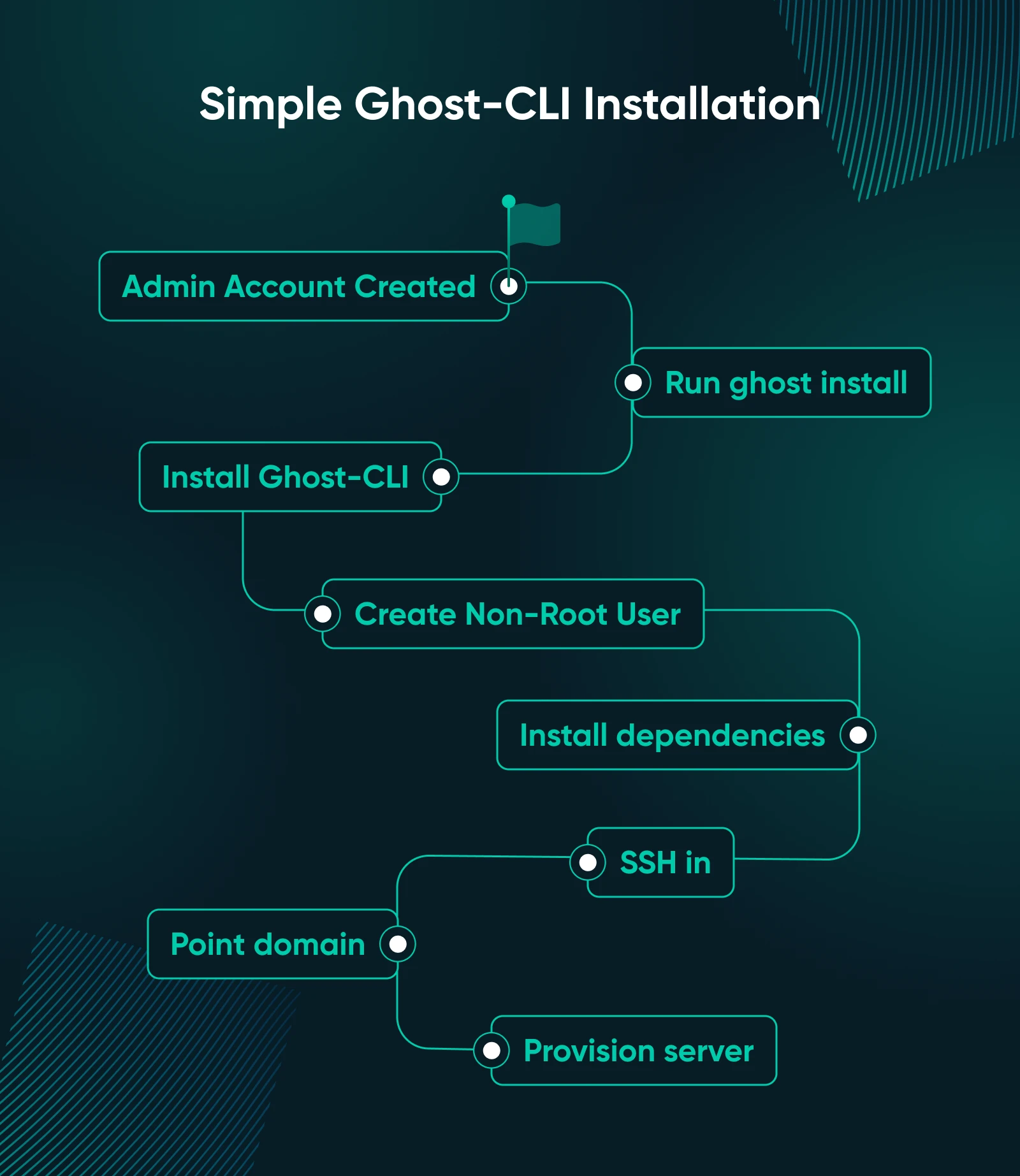
- Provision an Ubuntu 22.04 or 24.04 server with no less than 2 GB of RAM. At DreamHost, we suggest provisioning no less than 4 GB of RAM in the event you’re planning to ship newsletters.
- Level your area’s A report on the server’s IP handle.
- SSH into the server. SSH (Safe Shell) is the encrypted command-line connection to your VPS.
- Set up Node.js, MySQL 8, and Nginx through apt.
- Create a non-root consumer. Ghost-CLI gained’t set up as root, and that’s an excellent factor.
- Run
`npm set up ghost-cli@newest -g.` - Run
`ghost set up`and reply the prompts (area, MySQL password, and e mail). - Go to “https://yourdomain.com/ghost/” and create your admin account.
Ghost-CLI handles the Safe Sockets Layer (SSL) certificates through Let’s Encrypt, configures Nginx, and begins Ghost as a systemd service. Most installs take 15 to half-hour.
For the apt instructions, Nginx setup, and systemd config, observe the official Ghost set up information.
Technique 2: Docker Compose (Ghost’s Preview Path)
Ghost is presently testing a “batteries-included” Docker Compose stack that bundles Ghost, MySQL 8, and Caddy into one `docker compose up -d` command. That is anticipated to turn out to be the default set up methodology, but it surely’s not fairly there but.
Right here’s how one can get it operating:
- Provision an Ubuntu server with Docker 20.10.13 or larger.
- Clone Ghost’s reference Docker Compose configuration.
- Generate robust MySQL passwords with
`openssl rand -hex 32`. Ghost’s docs warn that database atmosphere variables can’t be modified after the primary boot, so set them fastidiously the primary time. - Edit the Caddyfile to level at your area.
- Run
`docker compose pull && docker compose up -d.` - Go to “https://yourdomain.com/ghost/” to create the admin consumer.
The Docker path is quicker to spin up and simpler to improve in place.
A possible downside is that you just’ll discover fewer neighborhood troubleshooting guides, and because it’s nonetheless in preview, you may run into edge circumstances that break in methods the Ghost‑CLI set up wouldn’t.
Each strategies deal with HTTPS by way of Let’s Encrypt and robotically renew certificates on a cron job. Computerized doesn’t imply assured, although, so verify renewal is working round day 60, effectively earlier than the 90-day expiration.
How Do You Set Up E mail for a Self-Hosted Ghost Publication?
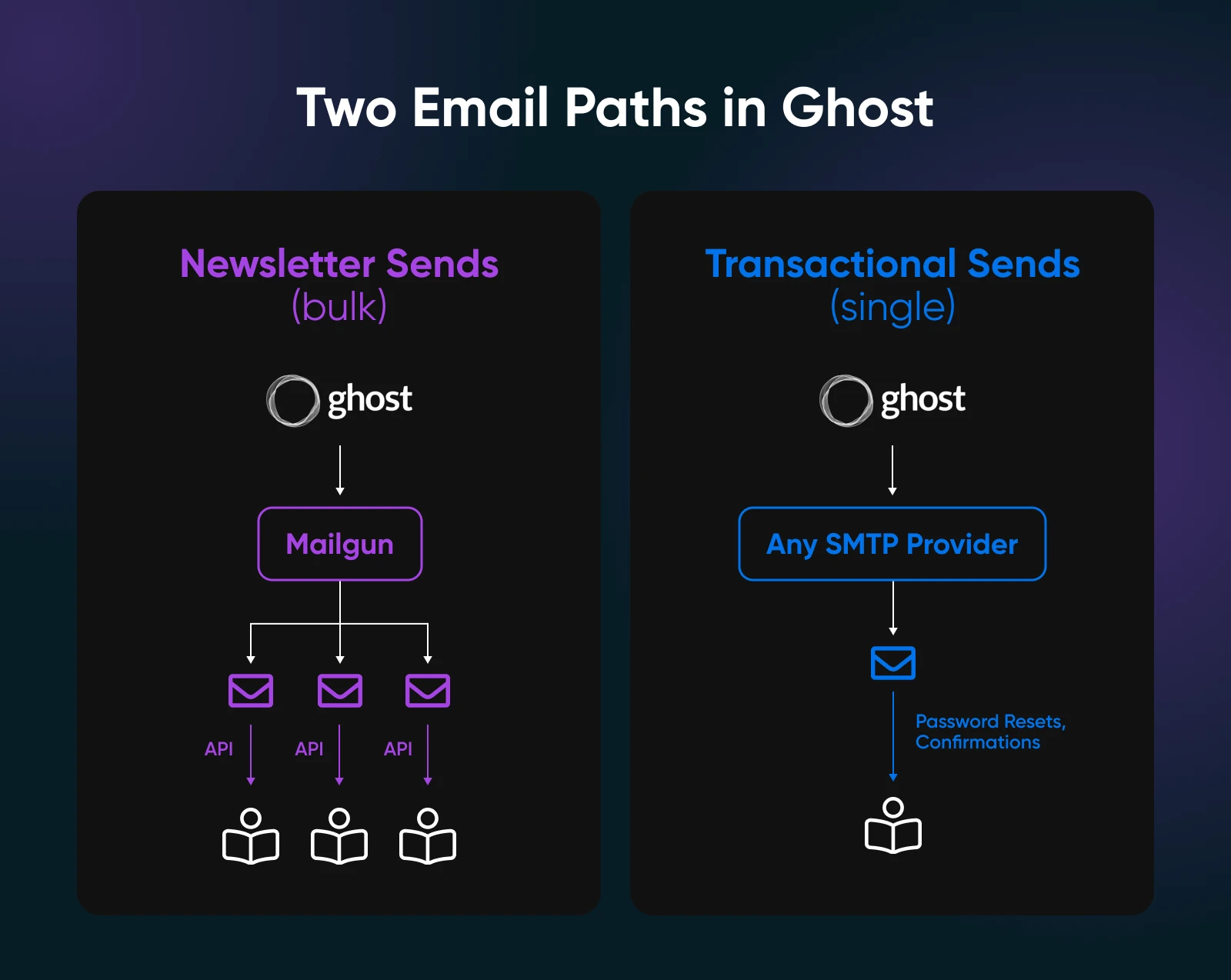
Self-hosted Ghost wants two separate e mail setups. Bulk newsletters run by way of Mailgun, the one bulk supplier Ghost integrates with.
Transactional emails like password resets, signup confirmations, and welcome messages can use any customary SMTP supplier. That is the half most set up guides skim over. Get it fallacious, and your subscribers will discover earlier than you do.
Bulk Publication E mail (Mailgun)
Connecting Mailgun is usually a DNS configuration job. Set it up as soon as, and also you gained’t want to the touch it once more.
Merely observe these steps:
- Create a Mailgun account and add a sending subdomain (`mail.yourdomain.com` is standard).
- Add the SPF, DKIM, and DMARC information from Mailgun to your DNS supplier. These three information inform e mail suppliers like Gmail and Outlook that your messages are respectable.
- Look forward to DNS to propagate so Mailgun can confirm the area.
- Drop your Mailgun API key and sending area into Ghost Admin below Settings > E mail publication.
- Ship a check publication and verify Gmail headers to verify SPF/DKIM/DMARC go.
Mailgun’s 2026 pricing is easy.
- Basis: $35/month, 50,000 sends, $1.30 per further 1,000 emails.
- Scale: $90/month, 100,000 sends, $1.10 per further 1,000 emails.
A publication that goes out twice per week to five,000 subscribers lands at 40,000 sends, which inserts effectively inside the Basis tier. At 10,000 subscribers, that doubles to 80,000 sends — at which level you’re both paying $74 on Basis with overage or shifting to Scale at $90 flat.
Transactional E mail (SMTP)
For transactional e mail, add your SMTP credentials to your Ghost atmosphere variables (or config.manufacturing.json for Ghost-CLI installs) by setting mail__transport=SMTP.
Any supplier with a port 587 endpoint works, together with Mailgun, SendGrid, Postmark, or Amazon Easy E mail Service (SES). Most creators simply reuse Mailgun for each, since transactional quantity is a fraction of publication sends.
How A lot Does It Actually Value to Self-Host Ghost?
A typical self-hosted Ghost publication prices $15 to $30 a month. That covers your VPS, area, and Mailgun.
By comparability, Ghost(Professional) Writer runs $29 a month flat, whereas Substack takes round 13–16% of each paid subscription.
With self-hosting, your prices scale with your subscriber rely. Ghost(Professional) and Substack scale with income.
Right here’s what self-hosting usually prices, damaged down by part:
| Part | Month-to-month value | Notes |
|---|---|---|
| VPS (4 GB, e.g., Stack 4) | Verify along with your supplier | Comparable 4 GB VPS companies run $12–$25/month.DreamHost Self-Managed VPS pricing to be confirmed. |
| Area | ~$1 | ~$9.99/12 months for .com domains |
| Mailgun (Basis) | $35 | 50,000 emails/monthFirst month free |
| Backups + monitoring | $0–$5 | Supplier-dependent |
| Complete typical | $15–$30 earlier than newsletters$50–$80 at scale | For a publication below 10,000 subscribers |
The $15–$30 determine covers a Ghost website with weblog posts and a free-tier publication. A paid publication sending two weekly points to hundreds of subscribers lands nearer to $50 to $80 a month, which remains to be cheaper than Substack on the similar income.
Right here’s the place the fee variations between platforms turn out to be most noticeable:
- Below $250/month MRR (month-to-month recurring income): Substack’s free tier is structurally cheaper than operating something your self.
- $250–$1,500/month MRR: Self-hosted breaks even rapidly. The ten% Substack take is now greater than your VPS invoice.
- Over $1,500/month MRR or 10,000+ subscribers: Self-hosted saves actual cash. Ghost(Professional) Enterprise at $199 is an affordable center path if you would like managed internet hosting with out the income lower.
A $20/month VPS is lower than the Stripe processing payment on a single $200 paid subscription. That’s what you commerce away by staying on Substack.
When Is Self-Internet hosting Ghost the Incorrect Name?
Self-hosting Ghost is the fallacious name in the event you’ve by no means used a command line, your publication earns below $250 a month, otherwise you’d fairly concentrate on writing than sustaining a server. Generally the precise reply is a managed service, and pretending in any other case simply wastes your time.
Under are some particular conditions the place self-hosting fails the cost-benefit check:
- First-time web site proprietor. Begin with Ghost(Professional) at $15/month or keep on Substack till you might have income price defending. The talents you don’t have but gained’t floor throughout launch week.
- Publication below $250/month MRR. Till your 10% chew is greater than a $20-a-month VPS, keep the place you’re.
- Not comfy with SSH and primary Linux. Self-hosting means you’re the particular person at 11 PM on a Saturday operating
`journalctl -u ghost`as a result of subscribers can’t log in. - You gained’t tolerate occasional outages. MySQL can run out of reminiscence after a kernel patch, and Caddy updates can break admin routes. These items don’t occur typically, however they do occur — and none of them are your drawback on Ghost(Professional).
- You want cellphone assist throughout a disaster. VPS internet hosting usually consists of ticket and callback assist, however not a 24/7 cellphone line. If “I would like a human proper now” is your stress response, managed internet hosting was constructed for you.
- You’re approaching 50,000 sends a month and have by no means configured SPF, DKIM, or DMARC. Deliverability points can simply value greater than Ghost(Professional) Enterprise’s $199 plan. A recent Mailgun IP takes weeks to season into Gmail’s good graces, and Ghost(Professional) is the higher name for a launch that may’t survive that delay.
In case you earn greater than $250/month in paid subscriptions, need full management over the database and themes, and are comfy sufficient with a terminal that `ghost replace` doesn’t set off anxiousness, self-hosting pays for itself the day you end the set up.
How Do You Migrate a Substack Publication to Self-Hosted Ghost?
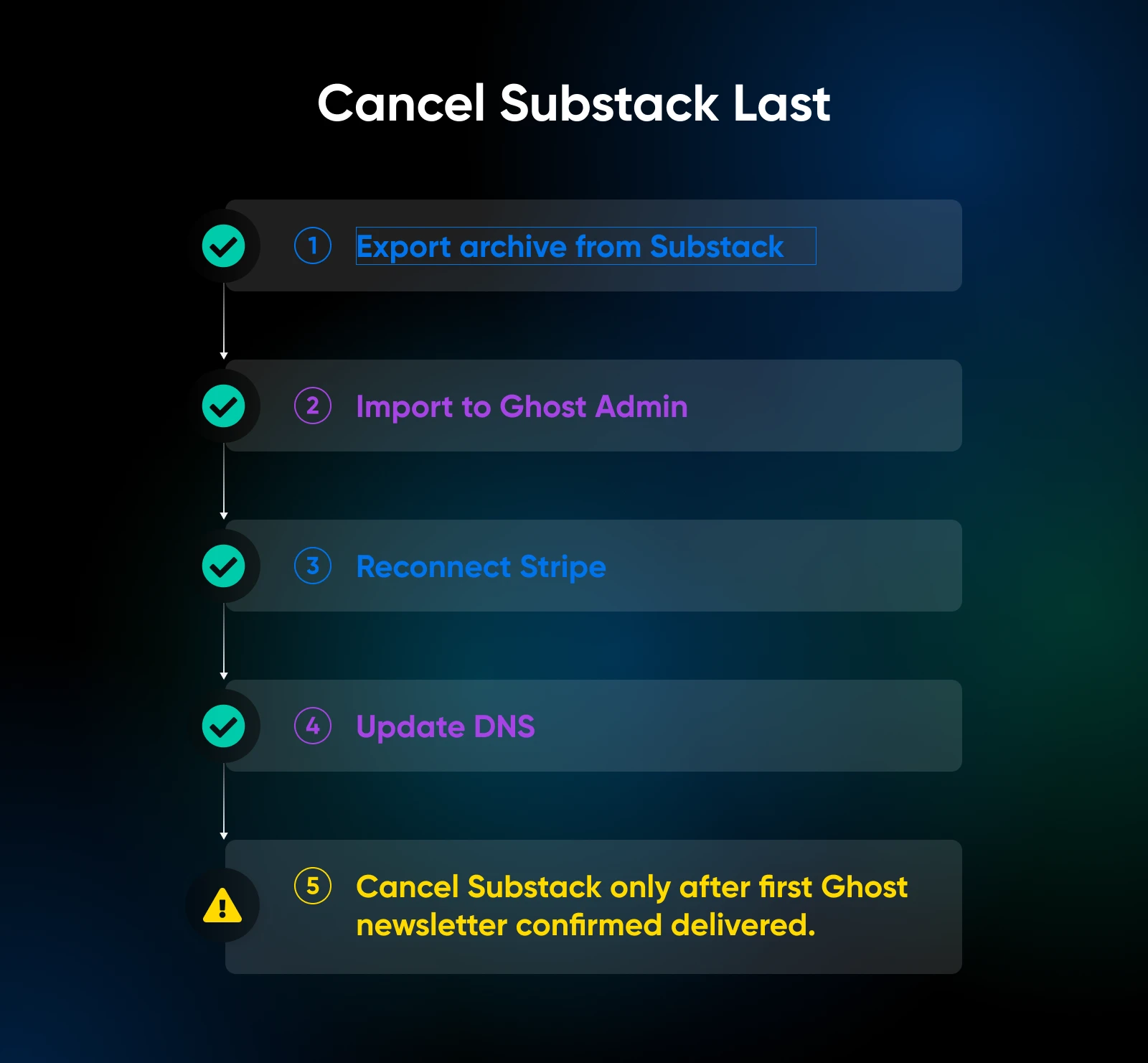
Ghost features a built-in Substack importer that strikes posts, members, paid subscriptions, and Stripe billing to your self-hosted Ghost website with out breaking cost continuity. The migration takes most creators a weekend.
Right here’s how one can do it:
- Export your Substack archive from publication settings. You’ll get a CSV of members and a ZIP of posts.
- Open Ghost Admin and go to Settings > Migration > Import/Export
Choose Substack from the checklist of choices. - Reconnect your Stripe account inside Ghost. Subscriptions switch robotically, and paying subscribers gained’t be re‑billed. Notice that Substack continues gathering its 10% payment on these present subscriptions till every subscriber’s billing cycle renews below Ghost.
- Replace DNS to level your customized area to the Ghost server.
- Cancel Substack solely after you’ve despatched no less than one publication from Ghost and confirmed deliverability.
Ghost’s Substack migration docs cowl edge circumstances, and Molly White’s Quotation Wanted walkthrough explains the gotchas of a midweek manufacturing migration.
Ought to You Ghost Substack?
Self-hosting Ghost is smart as soon as paid subscription income crosses about $250 a month. Under that, Substack prices nothing. Above it, the platform payment is usually the costliest line merchandise within the enterprise. Ghost erases that line.
In case you select to self‑host, you’ll be the one patching Ubuntu and watching MySQL reminiscence utilization. In return, you retain each greenback your subscribers pay. Whether or not that commerce‑off is price it’s as much as you.
Multiply the platform payment by 12 and resolve.
Then get again to writing as a substitute of procrastinating by studying this text.

Personal Your Whole Stack. Apps, AI, Databases, and Extra.
Preserve each credential and dialog on a server you management, with NVMe pace and unmetered bandwidth inbuilt.
Regularly Requested Questions About Self-Internet hosting Ghost
Nonetheless on the fence? Listed below are some questions most creators have earlier than switching to self-hosted Ghost.
Is Ghost CMS free to self-host?
Sure, Ghost is free and open supply below the MIT license. Self-hosting prices solely the server, area, and e mail service you select, usually $15 to $80 a month, relying on subscriber rely.
How a lot RAM does self-hosted Ghost want?
Self-hosted Ghost wants no less than 1 GB of RAM for a private weblog and 4 GB for a publication with 10,000+ subscribers. DreamHost Self-Managed VPS Stack 4 (4 GB) covers the publication baseline. Stack 8, then again, handles high-traffic publications or ActivityPub federation.
Ought to I exploit Docker Compose or Ghost-CLI?
Use Ghost-CLI for manufacturing. It’s the established path Ghost recommends and has essentially the most neighborhood troubleshooting content material.
Docker Compose stays Ghost’s preview set up methodology as of 2026. Select it provided that you’re comfy experimenting on the forefront.
Does self-hosted Ghost embrace e mail?
No, self-hosted Ghost requires bringing your individual e mail. Mailgun is the one bulk supplier Ghost integrates with for newsletters (Basis tier $35/month for 50,000 sends). Transactional mail makes use of any SMTP supplier.
How does Ghost evaluate to Substack on value?
Ghost takes 0% of subscription income versus Substack’s 10% (successfully 13–16% after Stripe charges). A publication incomes $60,000 a 12 months retains roughly $5,000 extra on Ghost. Break-even versus a self-hosted server lands round $250/month MRR.
Can I migrate from Substack to self-hosted Ghost?
Sure, Ghost has a built-in Substack importer that strikes posts, members, paid subscriptions, and Stripe billing to a self-hosted Ghost website. Paying subscribers maintain their Stripe playing cards intact throughout migration.
Is self-hosting Ghost price it?
Self-hosting Ghost is price it when you have primary command-line consolation and a paid publication incomes greater than $250/month. Under that line, Substack’s free tier or Ghost(Professional) Starter at $15 prices much less time and roughly the identical sum of money.
{
“@context”: “https://schema.org”,
“@graph”: [
{
“@type”: “FAQPage”,
“mainEntity”: [
{
“@type”: “Question”,
“name”: “Is Ghost CMS free to self-host?”,
“acceptedAnswer”: {
“@type”: “Answer”,
“text”: “Yes, Ghost is free and open source under the MIT license. Self-hosting costs only the server, domain, and email service you choose, typically $15 to $80 a month, depending on subscriber count.”
}
},
{
“@type”: “Question”,
“name”: “How much RAM does self-hosted Ghost need?”,
“acceptedAnswer”: {
“@type”: “Answer”,
“text”: “Self-hosted Ghost needs at least 1 GB of RAM for a personal blog and 4 GB for a newsletter with 10,000+ subscribers. DreamHost Self-Managed VPS Stack 4 (4 GB) covers the newsletter baseline. Stack 8 handles high-traffic publications or ActivityPub federation.”
}
},
{
“@type”: “Question”,
“name”: “Should I use Docker Compose or Ghost-CLI?”,
“acceptedAnswer”: {
“@type”: “Answer”,
“text”: “Use Ghost-CLI for production. It’s the established path Ghost recommends and has the most community troubleshooting content. Docker Compose remains Ghost’s preview install method as of 2026. Choose it only if you’re comfortable experimenting on the leading edge.”
}
},
{
“@type”: “Question”,
“name”: “Does self-hosted Ghost include email?”,
“acceptedAnswer”: {
“@type”: “Answer”,
“text”: “No, self-hosted Ghost requires bringing your own email. Mailgun is the only bulk provider Ghost integrates with for newsletters (Foundation tier $35/month for 50,000 sends). Transactional mail uses any SMTP provider.”
}
},
{
“@type”: “Question”,
“name”: “How does Ghost compare to Substack on cost?”,
“acceptedAnswer”: {
“@type”: “Answer”,
“text”: “Ghost takes 0% of subscription revenue versus Substack’s 10% (effectively 13–16% after Stripe fees). A newsletter earning $60,000 a year keeps roughly $5,700 more on Ghost. Break-even versus a self-hosted server lands around $250/month MRR.”
}
},
{
“@type”: “Question”,
“name”: “Can I migrate from Substack to self-hosted Ghost?”,
“acceptedAnswer”: {
“@type”: “Answer”,
“text”: “Yes, Ghost has a built-in Substack importer that moves posts, members, paid subscriptions, and Stripe billing to a self-hosted Ghost site. Paying subscribers keep their Stripe cards intact during migration.”
}
},
{
“@type”: “Question”,
“name”: “Is self-hosting Ghost worth it?”,
“acceptedAnswer”: {
“@type”: “Answer”,
“text”: “Self-hosting Ghost is worth it if you have basic command-line comfort and a paid newsletter earning more than $250/month. Below that line, Substack’s free tier or Ghost(Pro) Starter at $15 costs less time and roughly the same amount of money.”
}
}
]
},
{
“@kind”: “HowTo”,
“title”: “How one can Set up Ghost on a VPS Utilizing Ghost-CLI”,
“step”: [
{
“@type”: “HowToStep”,
“name”: “Provision a Ubuntu server”,
“text”: “Provision an Ubuntu 22.04 or 24.04 server with at least 2 GB of RAM. If you’re planning to send newsletters, provision at least 4 GB.”
},
{
“@type”: “HowToStep”,
“name”: “Point your domain at the server”,
“text”: “Point your domain’s A record at the server’s IP address.”
},
{
“@type”: “HowToStep”,
“name”: “SSH into the server”,
“text”: “SSH into the server. SSH (Secure Shell) is the encrypted command-line connection to your VPS.”
},
{
“@type”: “HowToStep”,
“name”: “Install dependencies”,
“text”: “Install Node.js, MySQL 8, and Nginx via apt.”
},
{
“@type”: “HowToStep”,
“name”: “Create a non-root user”,
“text”: “Create a non-root user. Ghost-CLI won’t install as root, and that’s a good thing.”
},
{
“@type”: “HowToStep”,
“name”: “Install Ghost-CLI”,
“text”: “Run npm install ghost-cli@latest -g.”
},
{
“@type”: “HowToStep”,
“name”: “Run the Ghost installer”,
“text”: “Run ghost install and answer the prompts (domain, MySQL password, and email).”
},
{
“@type”: “HowToStep”,
“name”: “Create your admin account”,
“text”: “Visit https://yourdomain.com/ghost/ and create your admin account.”
}
]
}
]
}
The put up Self-Host Ghost CMS: The Full Information appeared first on DreamHost Weblog.