Houston, now we have an issue. Your arch nemesis has been posting wonderful movies currently. They’re killing it on the socials.
You understand they haven’t bought the finances for a movie crew. They have to be utilizing Veo.
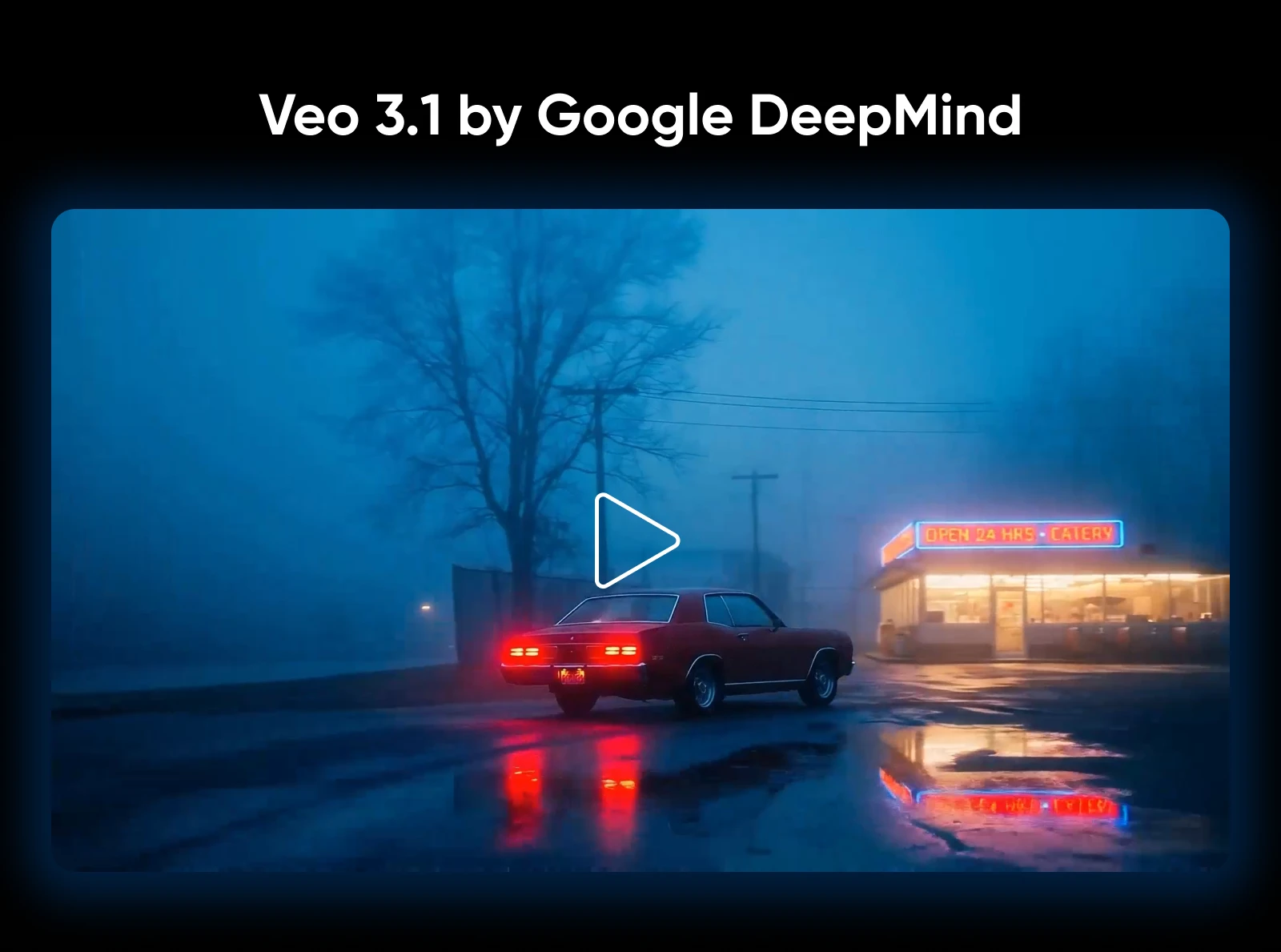
This AI video generator from Google permits you to generate movie-grade footage by merely typing in textual content prompts.
However how are they getting such good outcomes? Each time you strive Veo, the outcomes are underwhelming.
Right here’s the cruel actuality: you in all probability must improve your prompting recreation. You may’t simply enter “make a promo video for my product” and anticipate an awesome consequence.
The excellent news is, studying the way to immediate Veo isn’t rocket science. Give us 5 minutes, and we’ll clarify it proper right here!
How Does Veo 3.1 Work?
Veo 3.1 makes use of Google’s AI know-how to interpret your textual content request and construct an identical video, body by body. Veo can produce clips as much as two minutes lengthy at full 1080p decision.
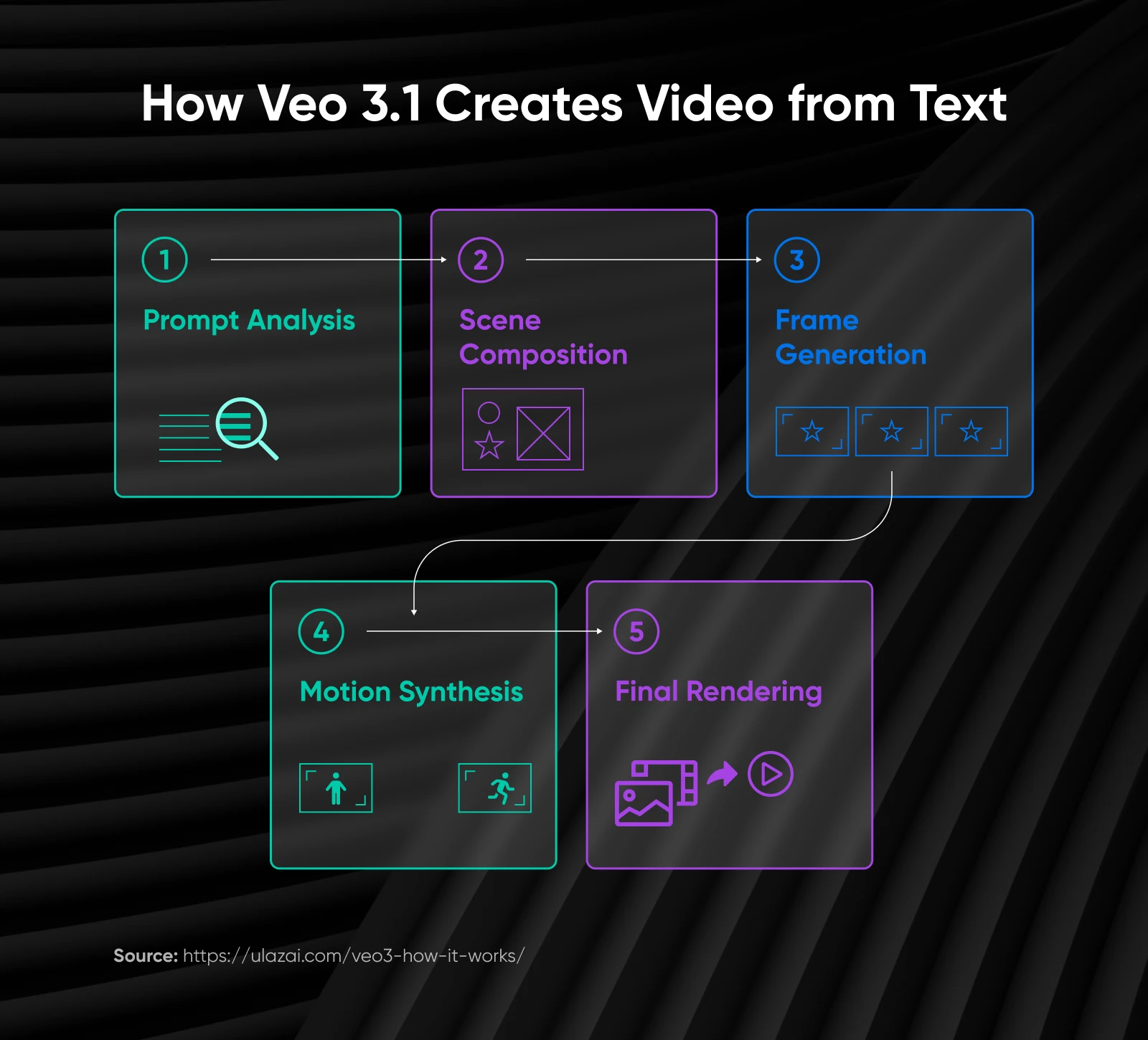
Whereas Google has not launched the technical documentation for VEO on the time of writing, we’re fairly certain the method seems like this:
- Immediate evaluation: Veo breaks down your textual content into visible parts.
- Scene composition: The AI maps out topics, the setting, and digital camera positioning.
- Body era: Particular person frames are created by means of an iterative noise-to-signal course of.
- Movement synthesis: The mannequin creates real looking motion between frames.
- Remaining rendering: You obtain a cultured, downloadable video clip.
How Do You Entry Veo 3.1?
To make use of Veo, you’ll want a Google AI Professional and AI Extremely subscription.
You may entry the software by way of Gemini, by means of the Stream AI storytelling editor software, or by means of Google Vids.
It’s additionally doable to make use of Veo by means of Vertex AI, Google’s cloud computing platform. However this methodology is a bit more tech-y.
What’s the Secret to Good Veo Prompting?
By a great deal of testing, we’ve realized that Veo 3.1 produces the perfect outcomes whenever you immediate such as you’re directing a shot, not simply describing a scene.
The most effective Veo prompts are additionally extremely particular, they usually embrace six key substances:
- Your topic and the motion
- Visible type
- Digicam work
- Lighting and ambiance
- Setting and setting
- Technical particulars
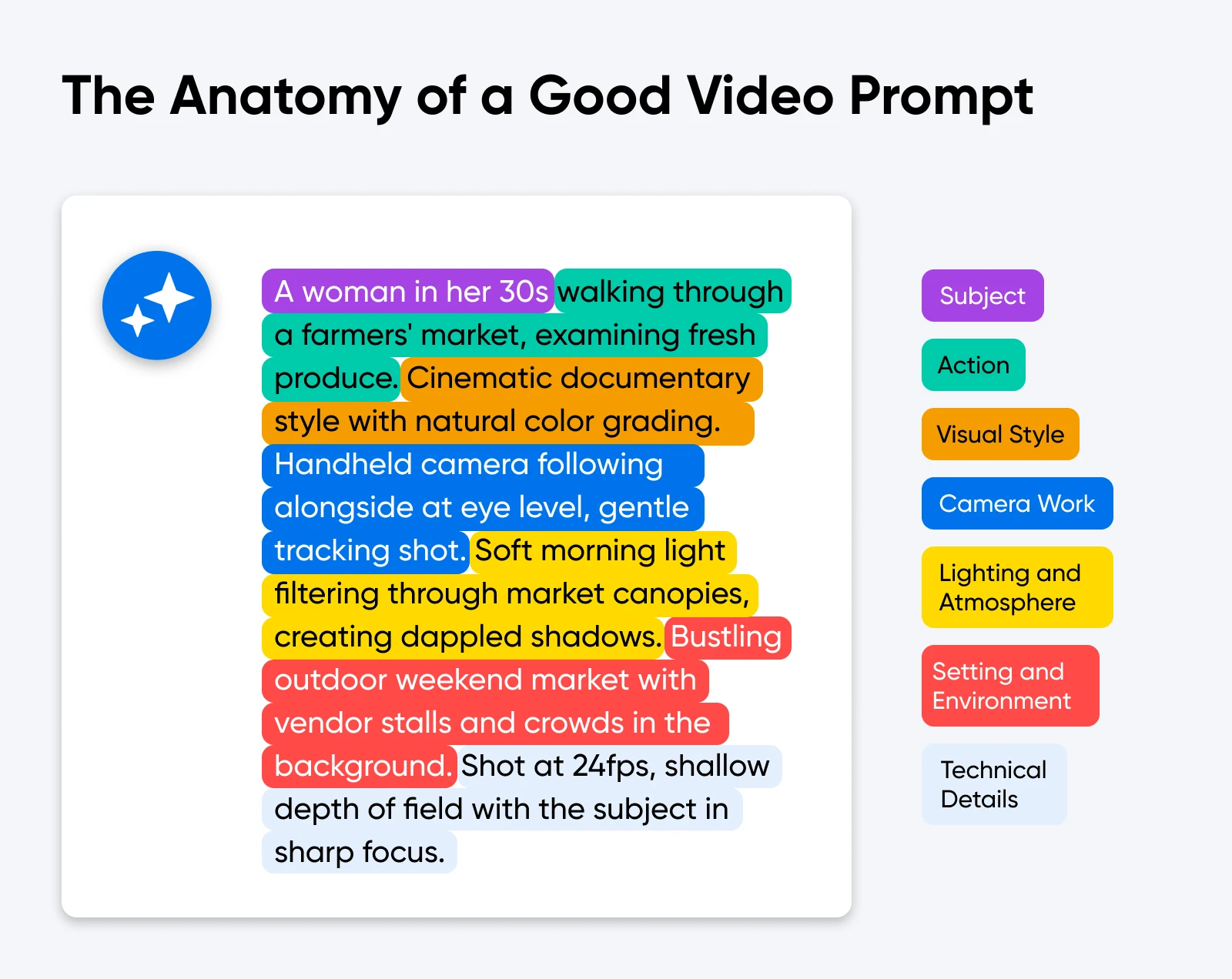
Hmm, that’s loads to consider. It’s simpler to know whenever you have a look at some examples.
An instance of a foul immediate can be:
Individual engaged on pc.
It’s generic, imprecise, and never detailed in any respect. You’re going to get some boring AI slop {that a} nine-year-old may create.
Now have a look at this immediate:
30-year-old girl in enterprise informal apparel typing on laptop computer at fashionable wood desk, aspect angle medium shot, pure window lighting from left, targeted expression, up to date workplace with crops seen in background.
As an alternative of constructing Veo guess what you need, you’re truly giving directions like a film director (simply minus the megaphone and the customized folding chair).
In consequence, the output will probably be far more polished.
How To Construct Good Veo Prompts?
The most effective Veo prompts embrace details about the topic of the video, what’s taking place within the scene, the broader setting, and the way it ought to all be captured.
Google has a Veo quickstart information that talks about these parts, but it surely’s fairly transient. To fill within the gaps, let’s take a more in-depth have a look at the important thing substances.
1. Topic and Motion
Begin by telling Veo about the principle topic in your video and what they’re doing. The extra descriptive, the higher.
One method that may assist: think about you’re on a telephone name with somebody and also you’re attempting to explain the scene so that they get a whole image. No element is simply too small: age, clothes, expressions, the lot.
Instance: Assured chef in white uniform chopping recent greens on bamboo chopping board.
💡Professional tip: Fairly than attempting to explain your complete scene in a single immediate, we discover it’s simpler to interrupt the motion into “beats” — particular person pictures that construct a narrative. Listed here are some key examples to strive:
- Establishing shot: Units the scene. Normally wide-angle.
- Push-in reveal: The digital camera strikes by means of the scene to finally land on the topic. Builds the stress for a giant reveal.
- The response: When your topic notices one thing, the viewer sees it too.
- The payoff: After the motion, we see the conclusion. Nice for exhibiting what blissful clients seem like!
- POV: Simulates being within the scene. Makes your movies really feel extra actual and immersive.
- Transition shot: Scene that creates continuity between one clip and the subsequent.
These pictures are your storytelling toolkit. Mix them to make clips that really feel extra like mini films!
2. Visible Type
What cinematic type are you hoping for?
Veo can produce something from cartoon animation to gritty photorealistic scenes straight out of a documentary. It might probably even tweak the ultimate video to your coloration and tone preferences. You simply must ask!
Examples:
- shot on 35mm movie, excessive distinction
- Pixar-style animation, heat tones
- company video aesthetic
3. Digicam Work
Despite the fact that you’re not utilizing an actual digital camera, Veo 3.1 nonetheless permits you to get behind the lens.
You may ask for any kind of shot, from an overhead view of a whole metropolis to a close-up of a person flower. You may management the motion and framing, as effectively.
Examples:
- Eye-level, monitoring shot
- Huge-angle, sluggish zoom
- Excessive close-up, pull focus
💡Professional tip: Veo understands the language {of professional} cinematography, so it’s price studying these phrases and utilizing them in your prompts, as a result of they provide you larger management over the completed video. Listed here are some strategies to strive:
- Gradual pan: Lets viewers take within the full scene, whereas noting the small print.
- Dolly-in: Digicam strikes easily towards the topic. Make it fast for drama, or mild to attract the eye subtly.
- Parallel trucking: The digital camera runs alongside the topic, just like the side-on view you see in film automotive chases. Creates a way of pace.
- Handheld urgency: Simulates the shake you get from shifting whereas filming with a telephone or camcorder. Makes viewers really feel like they’re within the motion.
- Crane shot: Elevates the digital camera, so you’ll be able to see the broader context or panorama.
- Whip‑pan reduce: Transition between scenes the place the digital camera swings sideways at pace, creating blur. Good for dynamism.
You may mix these phrases like this:
Medium eye‑degree shot with mild dolly‑in ~10% over 4 seconds, keep topic centered
4. Lighting and Ambiance
Would you like your video to be mild and floaty? Or do you like darkish and brooding? Veo 3.1 can do each — and all the pieces in between.
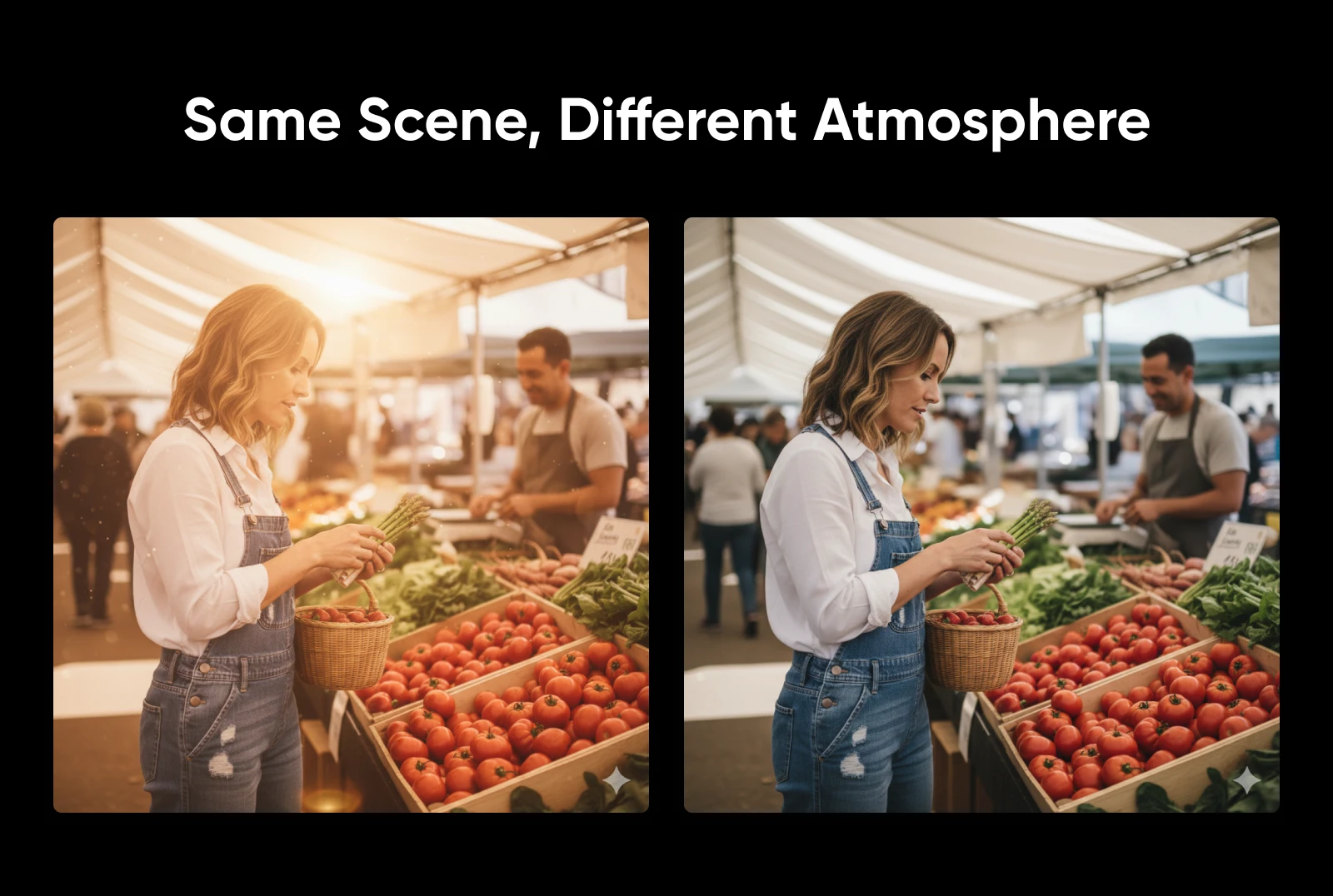
It’s not simply the temper, both. You may ask Veo to make use of particular forms of lighting, whether or not it’s the nice and cozy tones of the setting solar or the evident spotlights of a studio.
Examples:
- Vivid and cheerful
- Tender and intimate, pure window mild
- Moody and dramatic, aspect lighting
💡Professional tip: As soon as once more, we will name on the language {of professional} cinematography. Listed here are some extra key phrases to sprinkle into your prompts:
- Low-key: Aka minimal lighting. Typically used to create temper, with a single lamp lighting the scene.
- Noir: A darkish, dramatic lighting type utilized in basic thrillers. Typically contains low-key lighting.
- Excessive-key: The alternative. Floods the scene with brightness, both from a studio setup or pure mild. Makes issues really feel blissful and ethereal.
- Cool/heat practicals: These are mild sources seen to the viewer, reminiscent of headlamps on a automotive. Cool sources are inclined to make issues really feel chilly, whereas heat practicals create a comfortable really feel.
- Motivated lighting: This mild comes from sources the viewer can’t see, reminiscent of a streetlamp casting mild down on an individual at night time.
- Backlighting: Because the title implies. Places the topic into shadow, so their define is extra noticeable.
- Haze: When mixed with backlighting, hazy situations create an actual sense of ambiance.
Right here’s how you would mix them in your prompts:
Low‑key noir with motivated LED backlighting, deep shadows, dusty haze
Need extra examples? The oldsters at Skywork made an incredible information to shot lists, digital camera work, and lighting.
5. Setting and Setting
When you’ve handled the small print, inform Veo in regards to the larger image.
Set the scene. Clarify the place the principle topics are and what’s within the background. Once more, attempt to be as descriptive as doable.
Instance: Busy futuristic metropolis avenue, neon lights, site visitors, after darkish
6. Technical Parameters
To spherical off your immediate, give Veo some tech specs for the completed video.
For example, you’ll be able to ask for clips of a sure size or cropped in a selected side ratio. You may also set the general pacing of the clip and select the depth of discipline for sharp focus.
(Observe: Proper now, VEO 3.1 can create clips of 4, 6, or 8 seconds at as much as 1080p decision. You may select between 16:9 and 9:16 side ratios.)
Instance: 8-second timelapse, shallow depth of discipline, 9:16 portrait ratio
Placing It All Collectively
Let’s throw all these substances right into a mixing bowl and make one thing visually scrumptious.
Right here’s a textbook instance of a full immediate that hits all of the necessities, and provides some seasoning:
Barista in informal denim apron fastidiously pouring steamed milk into ceramic mug creating latte artwork, palms shifting slowly and intentionally exhibiting the swirl sample forming, targeted focus on the pour, early 30s with tied-back hair, heat documentary type with barely desaturated colours giving genuine native café aesthetic, shot on 35mm movie look with refined grain, inviting and real fairly than overly polished, medium close-up shot at 45-degree angle to the work floor, digital camera slowly pushes in from medium to close-up of the latte artwork because it types ending with detailed view of completed rosetta sample, smooth early morning golden hour mild streaming by means of massive home windows from digital camera left, heat and welcoming with pure shadows, mud particles seen within the sunbeams creating cozy café ambiance, skilled espresso bar with darkish wooden counter, copper espresso machine partially seen in background blur, cabinets with ceramic mugs and low gear softly out of focus, crops close to window, comfy neighborhood café setting, 7 seconds, real-time movement pace, shallow depth of discipline conserving deal with the milk pour and latte artwork, vertical 9:16 format for Instagram Reels
Excellent? No.
Nevertheless it’s an awesome start line, and it solely took about one minute to generate.
How Do Creators and Small Companies Truly Use Veo 3.1?
The principle good thing about utilizing Veo is which you could create movies that will be too costly to have produced professionally.
For example, most creators and small enterprise house owners don’t have the assets to rent a crew for each social media publish. However they can afford a Google subscription.
Listed here are some real-world examples of how content material creators and entrepreneurs use Veo:
Teaser Video for a New On-line Images Course
Say you want taking photographs of spiders. You’re actually good at it, truly. So, you resolve to create a course to assist all of the arachnophiles on this planet seize higher pictures.
You’d wish to promote the course forward of launch, after all. Right here’s how you would use Veo to create a cool little teaser:
Photographer’s palms holding skilled DSLR digital camera with massive macro lens fastidiously positioning it near delicate spider net lined in morning dew droplets, small backyard spider seen on net with intricate element, close-up of fingers making exact changes to focus ring and aperture controls, smooth early morning golden mild creating stunning bokeh and illuminating the online strands, passionate cautious actions exhibiting experience in macro pictures, documentary type shot on 35mm movie aesthetic with wealthy pure colours, aspect angle medium shot exhibiting photographer’s deliberate positioning then shifting to excessive close-up of digital camera LCD display displaying the spider net composition, peaceable out of doors backyard setting with crops softly blurred in background, skilled but approachable ambiance for nature pictures, 8 seconds, real-time pace exhibiting affected person deliberate technical changes wanted for macro work, very shallow depth of discipline with dreamy background blur, 16:9 panorama format
Suggestions:
- Use a voiceover to clarify what college students will find out about macro pictures and dealing with spiders, then add textual content overlays with key course modules.
- Mix AI footage with 10 seconds of actual footage exhibiting your precise face and your greatest actual spider photographs to show your experience.
Web site Video for a Freelance Bookkeeper
Think about you provide bookkeeping companies to native shoppers, and your small business is taking off. It’s about time you had a skilled web site. (Psst… DreamHost provides versatile internet hosting at a worth any small enterprise can afford).
The design and replica are wanting good…however there’s one thing lacking. Ah, we all know! It’s a video to hook guests. Right here’s how you would create an awesome intro video:
Assured skilled girl in early 40s carrying good enterprise informal apparel sitting at organized fashionable desk with laptop computer, heat real smile wanting immediately at digital camera place with approachable pleasant expression, pure conversational posture with palms seen resting on desk, up to date shiny dwelling workplace setting with bookshelf and indoor crops in smooth background blur, pure window lighting from digital camera proper creating smooth highlights on face {and professional} glow, clear organized workspace conveying competence and a focus to element, medium close-up framing from mid-torso up exhibiting skilled but personable presence, static digital camera at eye degree creating direct reference to viewer, welcoming ambiance that builds belief, Pixar-style animation with heat coloration tones, 8 seconds, real-time pure respiration and refined actions exhibiting genuine character, medium depth of discipline conserving topic sharp with tasteful background softness, 16:9 panorama format for web site embedding
Suggestions:
- Mute the AI video and overlay your actual voice introducing your self and your companies (the skilled presence issues greater than excellent lip-sync).
- Add textual content overlays all through, highlighting your credentials.
Promotional Clips for an Creator’s New E-book
Perhaps you’re an aspiring creator. To promote your new e book, you must make folks curious in regards to the contents. You might publish the primary chapter, however that will nonetheless require a time funding — and it’s not very social-media pleasant.
What for those who created a video model of the perfect scenes in your e book with Veo? Right here’s what it’d seem like:
Dimly lit classic library inside with floor-to-ceiling bookshelves full of previous leather-bound volumes, vintage studying lamp casting heat pool of sunshine on mahogany desk lined with scattered previous letters and images, mysterious ambiance with mud particles floating in lamp mild, ornate magnifying glass resting on handwritten notice, shadows creating intrigue in corners of room, rain seen by means of tall Gothic window in background, moody cinematic aesthetic with wealthy heat tones and deep shadows like basic thriller movies, digital camera slowly pushes in from huge establishing shot to close-up of the mysterious paperwork on desk, suspenseful contemplative temper evoking secrets and techniques and discovery, 8 seconds, real-time movement with occasional paper flutter from unseen breeze, shallow depth of discipline with background gently blurred creating intimate deal with the clues, 16:9 panorama format.
Suggestions:
- Generate atmospheric scenes that immediately signify key settings out of your e book to offer viewers a visible style of your story world.
- Create 15-second, 30-second, and 60-second movies for various platforms by combining a number of VEO-generated clips, and at all times embrace actual footage exhibiting your precise e book cowl on the finish.
Background Video for Canine Coach Testimonials
As a canine coach, your companies are getting glowing critiques. You wish to share a few of these testimonials on social media, however textual content alone isn’t very partaking.
To make the quotes extra eye-catching, you would use Veo to create a background video that matches the theme of your small business:
Spacious shiny canine coaching facility inside with skilled rubber ground mats and colourful agility gear together with jumps, tunnels, and weave poles organized in background, massive home windows with pure daylight flooding the house, clear fashionable coaching middle with constructive welcoming power, coaching treats and toys organized on cabinets, motivational canine coaching posters on partitions, some coaching cones and markers positioned round house, up to date transformed warehouse with excessive ceilings and glorious lighting, digital camera slowly pans proper throughout the empty facility exhibiting the whole skilled setup prepared for coaching periods, uplifting energetic ambiance excellent for testimonials about canine coaching success, documentary type with crisp clear aesthetic emphasizing the skilled authentic enterprise setting, medium-wide shot exhibiting breadth and high quality of facility, even shiny lighting all through creating reliable industrial really feel, 8 seconds, sluggish regular panning movement revealing the total coaching house, deep focus conserving total facility sharp and clearly seen, 16:9 panorama format.
Suggestions:
- Experiment with totally different coaching environments so your testimonial movies have selection and don’t look repetitive.
- Add refined blur to maintain the testimonials within the highlight, and embrace textual content within the decrease third, with consumer and canine names.
5 Confirmed Veo Immediate Templates You Can Remix
The simplest Veo 3.1 prompts are inclined to observe tried-and-tested formulation.
In different phrases, you don’t must provide you with one thing distinctive for each video — you’ll be able to simply tweak one thing that has labored effectively earlier than.
Listed here are some widespread examples you’ll be able to remix on your personal content material:
1. The Product Demo Video
Veo 3.1 can’t make movies about your particular product, however it might showcase the advantages of that kind of product. These clips are nice for launch teasers and social content material.
Construction: [Person] utilizing [product category] in [realistic scenario], [clear view of interaction], [appropriate setting].
Instance: Skilled girl in fashionable kitchen making ready recent salad utilizing sharp chef’s knife on bamboo chopping board, overhead shot exhibiting palms chopping colourful greens, shiny pure morning lighting, clear organized countertop.
💡Professional tip: You may at all times do some video enhancing (see the Superior Strategies part beneath) so as to add your branding to the Veo-made video.
2. The Completely happy Buyer Video
How does your services or products make clients really feel? You should utilize Veo to deliver success tales to life. It may be a strong advertising software.
Construction: [Target customer] in [result state] inside [relevant environment], [emotional indicators], [aspirational setting].
Instance: Relaxed couple of their 30s sitting comfortably on fashionable sofa in shiny lounge with shifting packing containers seen in background, relieved expressions after finishing anxious job, afternoon daylight by means of massive home windows, cozy organized house.
💡Professional tip: To make the scene appear credible, be sure it’s really related to your services or products. For instance, the immediate above can be excellent for a shifting firm.
3. The Course of Video
In some niches, the top consequence isn’t all the pieces. Clients wish to know that you simply put some care and energy into what you do.
Filming your total course of may be a problem, however you may give a way of your methodology utilizing Veo-made movies.
Construction: [Skilled hands/person] performing [detailed craft work], [multiple angles of process], [professional environment].
Instance: Expert palms of artisan fastidiously sanding clean wood furnishings piece, close-up exhibiting element of wooden grain and exact round motions, workshop setting with instruments seen in background, pure subtle lighting exhibiting texture and craftsmanship
💡Professional tip: It’s not a good suggestion to deceive your clients. So, don’t faux these clips are actual. Current them as visible aids to know the kind of work you do.
4. The Seasonal Video
Operating some vacation promotions? You may want a video with that. Veo permits you to whip up seasonal clips to be a focus for scrolling patrons.
Construction: [Seasonal environment/activity], [clear seasonal indicators], [relevant emotional tone].
Instance: Busy retail purchasing avenue throughout vacation season, folks carrying wrapped present baggage and packages, storefront home windows embellished with lights, early night blue hour with heat store lighting glowing, mild snow falling, festive cheerful ambiance.
💡Professional tip: Attempt making a number of of those in a single session, every for a unique vacation or seasonal occasion. Your future self will probably be eternally grateful.
5. The Educator Video
End up explaining over and over how your product works? Attempt creating an training video with Veo. Once more, it received’t be branded, however that doesn’t actually matter for getting your level throughout.
Construction: [Clear demonstration of concept or process], [step-by-step visual progression], [educational clarity].
Instance: Cross-section view of dwelling exhibiting how warmth escapes by means of home windows and partitions, thermal imaging impact with color-coded temperature zones, animated arrows indicating warmth loss patterns, sluggish methodical digital camera motion explaining every space, academic documentary type.
💡Professional tip: Once more, think about spending your finances on a high-quality voiceover. It would make all of the distinction!
What Are Some Superior Veo Prompting Strategies?
By now, you’re in all probability creating some fairly good movies with Veo, however possibly you wish to add a little bit polish or strive one thing extra bold. Both approach, these superior prompting strategies will allow you to unlock the total potential of Google’s AI video maker!
Begin Easy and Iterate
Anybody who works with AI commonly will inform you: getting the proper output on the primary try is actually onerous.
Fairly than attempting to construct the proper immediate on the first try, we’ve discovered that beginning with a easy immediate typically produces higher outcomes. You may then tweak the components and add particular necessities, little by little.
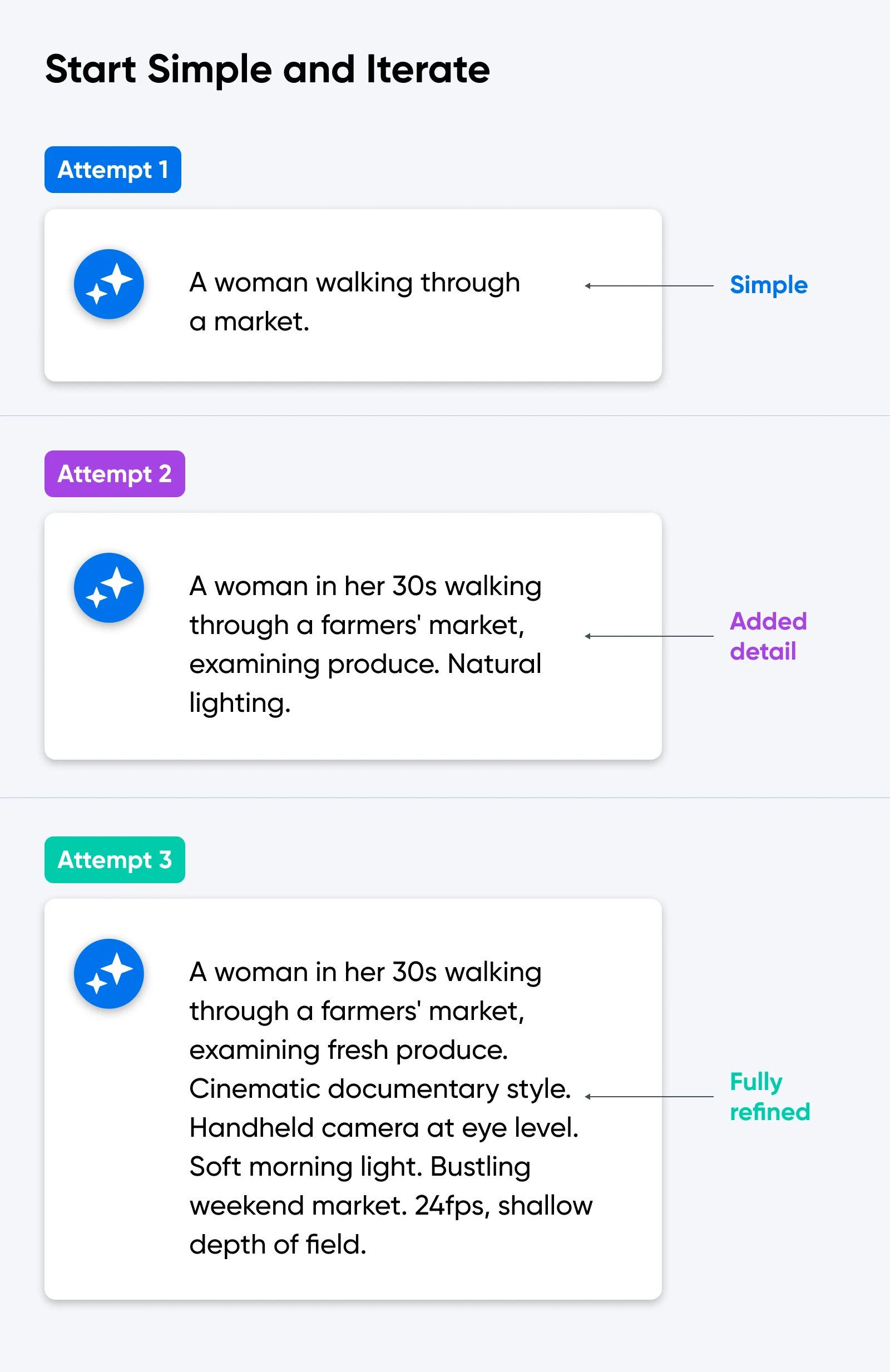
As soon as the output is near what you need, it’s even price operating the very same immediate by means of Gemini a few occasions. You’ll get a barely totally different output every time.
Bear in mind, making AI movies is a inventive course of. Don’t rush it.
Throw in Some References
Veo is like probably the most educated movie historical past scholar of all time. It is aware of each director, cinematic impact, and creative motion.
You should utilize this to your benefit by including stylistic references to your prompts. You may even point out particular movies.
Examples:
- Wes Anderson type
- Apple industrial aesthetic
- Movie noir lighting
- Kodak Portra 400 coloration grading
Outline What You Don’t Need
Veo 3.1 is wise sufficient to know unfavourable directions in prompts. This implies you’ll be able to clearly outline something you don’t wish to seem within the clips.
Unfavourable instructions are notably helpful whenever you’re attempting to create one thing fairly particular. Fairly than asking Veo to guess what you need, you’ll be able to merely rule out concepts that received’t fulfill your inventive imaginative and prescient!
Examples:
- A street with no automobiles or vans
- A bouquet with no pink flowers
- A bookcase with no books on the cabinets
Add Some Emotion
If you happen to’re attempting to construct a scene that features characters, it’s price telling Veo which feelings you’re attempting to convey.
Micro-actions work rather well for this.
Instance: “She seems up… he notices her… a pause… breath catches… eyes lock.”
That rhythm provides the mannequin one thing “human” to construct from.
Select One Principal Character
In our checks with Veo, we noticed that the mannequin produces its greatest work for those who deal with a single character. Including extra complexity on the first try typically leads to weirdness.
If Veo nails the single-character scene, you’ll be able to then strive two-person interplay. We wouldn’t advocate going additional; multi-subject scenes are nonetheless a weak spot.
Management Pacing and Rhythm
Would you like your generated movies to really feel energetic or relaxed? The vibe will probably be closely influenced by the tempo of the motion.
In your prompts, strive telling Veo what pacing and rhythm you’re aiming for.
Examples:
- sluggish movement
- time-lapse
- contemplative and sluggish
- energetic and quick-cut
Take Management of Audio
As you begin producing movies, you’ll discover that Veo 3.1 provides audio to each clip. It often takes a superb stab at matching sound to the images.
However why go away it to probability? You may simply specify what soundtrack you need, proper in your immediate. That features dialogue, sound results, and the ambient background.
Instance:
A younger boy says, “I’ve missed you a lot,” with the sound of a practice pulling away from a station and passengers speaking within the background.
Add Actual Individuals to Your Movies
If you happen to solely use textual content prompts, Veo 3.1 will generate imaginary characters. However for those who add a reference picture alongside together with your immediate, you’ll be able to ask Veo to create a likeness of an actual individual.
Right here’s one easy method from DreamHost’s resident AI knowledgeable, Tyler Hacker:
“I took a nonetheless picture of myself because the ‘begin body,’ after which took a cropped-in, close-up screenshot of myself because the ‘finish body.’ The ultimate consequence was not simply wonderful but additionally hilarious.”
“If you happen to take any nonetheless picture, you’ll be able to:
1. Crop in
2. Take a screenshot as soon as cropped in
3. Use the unique picture firstly body
4. Use the cropped-in screenshot as the top body
5. Immediate Veo 3.1 to do a sluggish zoom (or dolly zoom for added coolness)”
Together with actual folks in your video continues to be a bit hit or miss in Veo 3.1. However as a basic rule, including extra reference pictures tends to supply higher outcomes.
Use Veo With Stream
Utilizing Veo by means of Gemini is nice whenever you’re getting began, as a result of the interface is fairly easy.
When you begin coming to grips with the software, we’d advocate shifting to Stream. This video enhancing software permits you to mix Veo-generated clips into longer movies.
It additionally lets you insert customized visible parts (referred to as “Components”) into your clips. That features your individual branding, photos of your product, and pictures you’ve generated utilizing AI.
👉Take a look at some quick movies made utilizing Stream and Veo right here.
Study From the Consultants at Google
With the discharge of Veo 3.1, Google truly printed a useful information that features some superior filmmaking strategies.
It’s important studying for anybody who needs to get actually bold with Veo!
In the appropriate palms, Veo is a strong software for creating video content material — it’s quick, versatile, and way more reasonably priced than skilled video manufacturing.
To get probably the most out of Veo, take note the rules we’ve realized:
- Make your prompts detailed and descriptive.
- Embody the topic, motion, type, digital camera motion, lighting, temper, setting, and tech specs.
- Don’t anticipate perfection on the primary try; hold iterating.
- Reference well-known types you want.
- Keep away from creating movies that mislead your viewers.
- Use common video enhancing strategies so as to add the ending touches.
Give it a go — we will’t wait to see your Veo-made movies!
Professional Companies – Advertising
Get Extra Guests, Develop Your Enterprise
The most effective-designed web site is nugatory if nobody can discover it. Leverage confirmed on-line advertising methods and strategies to assist extra of your audience discover you.
Veo Video Prompting FAQs
Nonetheless interested by Veo? Now we have you lined! Listed here are some widespread questions in regards to the software:
How lengthy does it take to generate a video with Veo 3.1?
Era usually takes 3-10 minutes, relying on video size and complexity. Extra detailed prompts with advanced actions are inclined to take a little bit longer.
Can I take advantage of Veo-generated movies commercially?
In line with Google’s present phrases, content material generated with Veo 3.1 can be utilized for industrial functions — however at all times verify the newest utilization pointers earlier than publishing.
What’s the utmost video size Veo 3.1 can create?
Veo 3.1 can generate movies as much as two minutes lengthy in a single era. For longer content material, you’ll must create a number of clips and edit them collectively.
Do I would like particular expertise to make use of Veo 3.1?
No technical expertise required, however an understanding of primary cinematography and visible storytelling rules is a big benefit.
Can Veo 3.1 embrace textual content or logos in movies?
Textual content era in AI video is enhancing, but it surely’s nonetheless fairly janky. As an alternative, we’d advocate including textual content overlays and logos utilizing normal video enhancing software program.
Did you take pleasure in this text?