
Within the dying embers of 2025, the first workforce behind WordPress launched a brand new factor known as Telex.
This AI-powered instrument enables you to describe any block in your mom tongue, and see it coded from scratch earlier than your eyes.
We all know what you’re pondering… utilizing AI to construct web sites just isn’t new. We even have our personal instrument for DreamHost prospects!
However many individuals say Telex represents an enormous leap ahead. This AI coder can create customized performance — the kind that might sometimes require a plugin or the assistance of an skilled developer.
Sounds ah-maze-ing. However does Telex stay as much as the hype? We needed to take it for a check drive ourselves.
What Is WordPress Telex?
Within the phrases of Automattic (one of many firms behind WordPress):
“Telex is an experimental instrument from the Automattic AI workforce that turns natural-language prompts into working WordPress blocks. You merely describe what you need, and Telex generates the block.”
Telex runs on the WordPress Playground: a platform that allows you to fiddle with WordPress with out internet hosting.
It’s at the moment free to make use of with no limits, and you’ll obtain something you make to put in by yourself self-hosted web site.
How Does WordPress Telex Work?
Like most AI coding instruments, Telex makes use of a big language mannequin (LLM) to interpret your textual content directions. Then, it really works out a plan for constructing the block, earlier than lastly writing the mandatory code.
Let’s take a more in-depth take a look at the app in motion.
1. Constructing Your Immediate
The workflow is fairly easy. You will have a textual content field for prompts, and the choice so as to add pictures (as much as 5) as an instance your request.
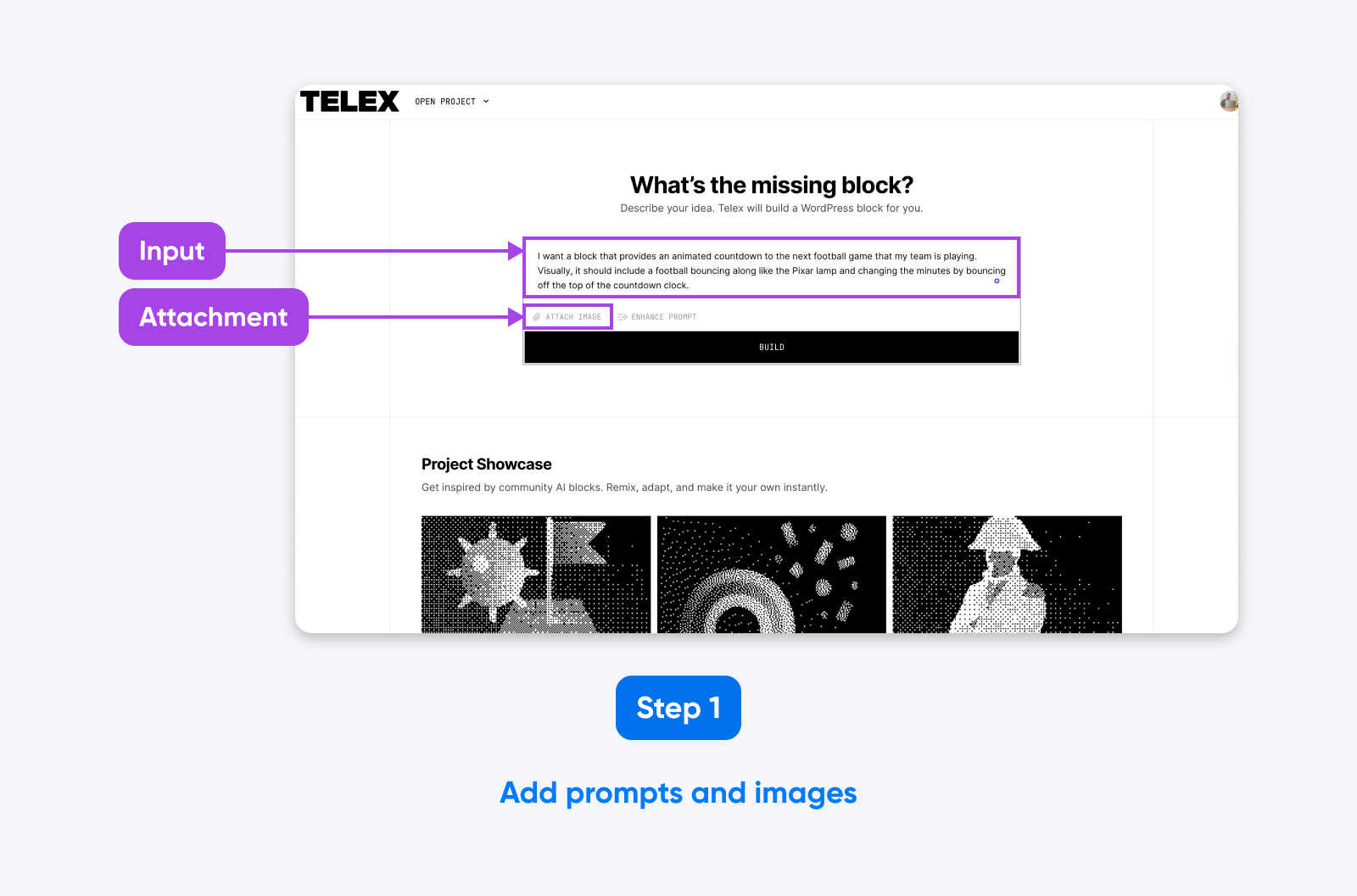
After you start writing your immediate, the “Improve Immediate” button seems; this makes use of AI to flesh out your unique immediate.
🤓Nerd be aware: The immediate enhancer doesn’t appear to work if you have already got a picture hooked up to your immediate. We suggest utilizing this characteristic earlier than including visuals.
2. Telex Writes the Code
When you set Telex into motion, you possibly can watch the AI “pondering” within the terminal on the backside of the display. It’s fairly endearing, actually.
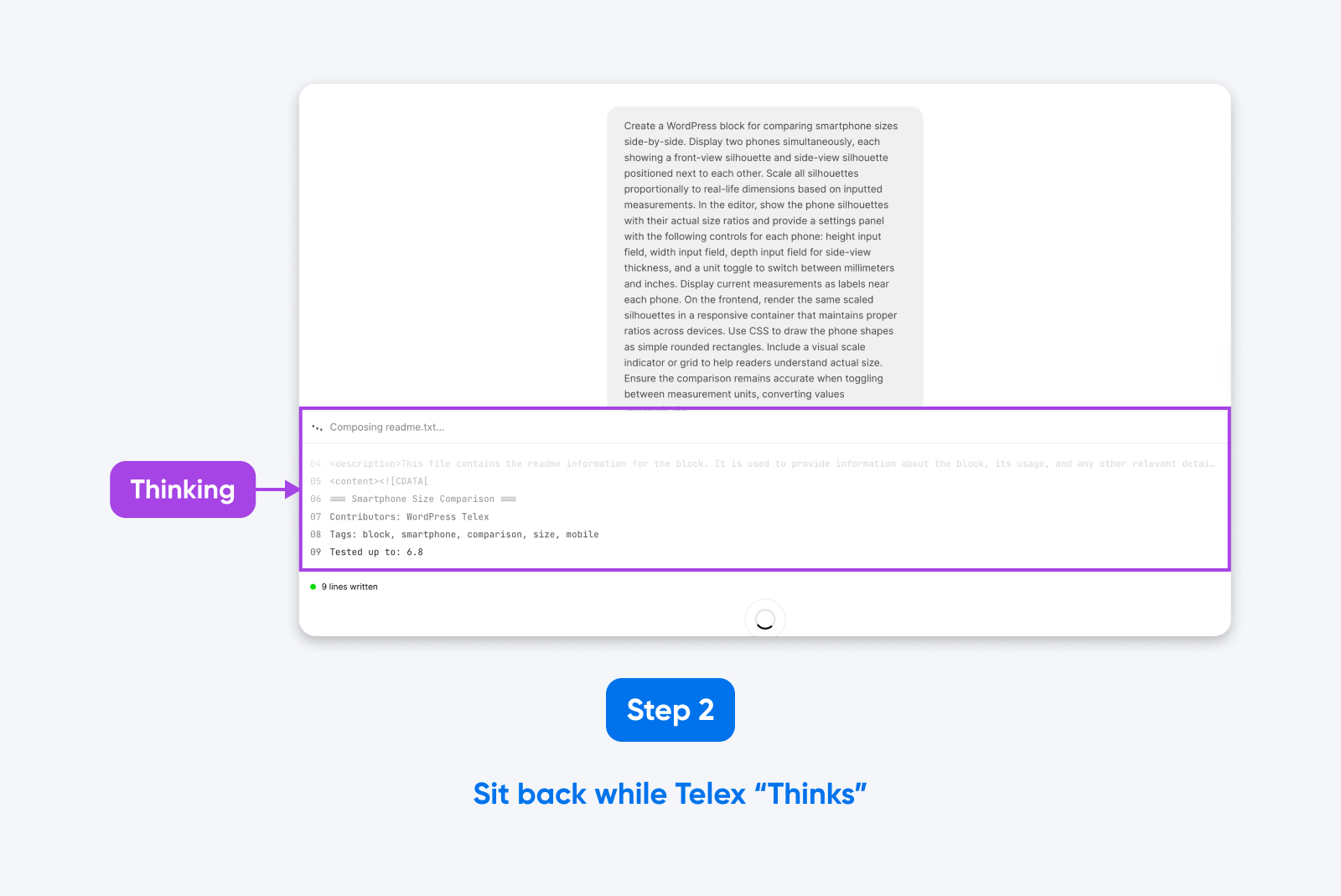
Telex then begins writing code like a hackathon contestant who’s had an excessive amount of espresso. You normally get the ultimate end result inside two minutes.
3. Testing and Refining
As soon as the primary construct is full, you possibly can check an actual, working model of your creation within the block editor. This space additionally permits you to see a preview of the entrance finish, and your admin space.
Not fairly proper? You’ll be able to both ask Telex for revisions or swap to the “Code” tab to make the adjustments your self.
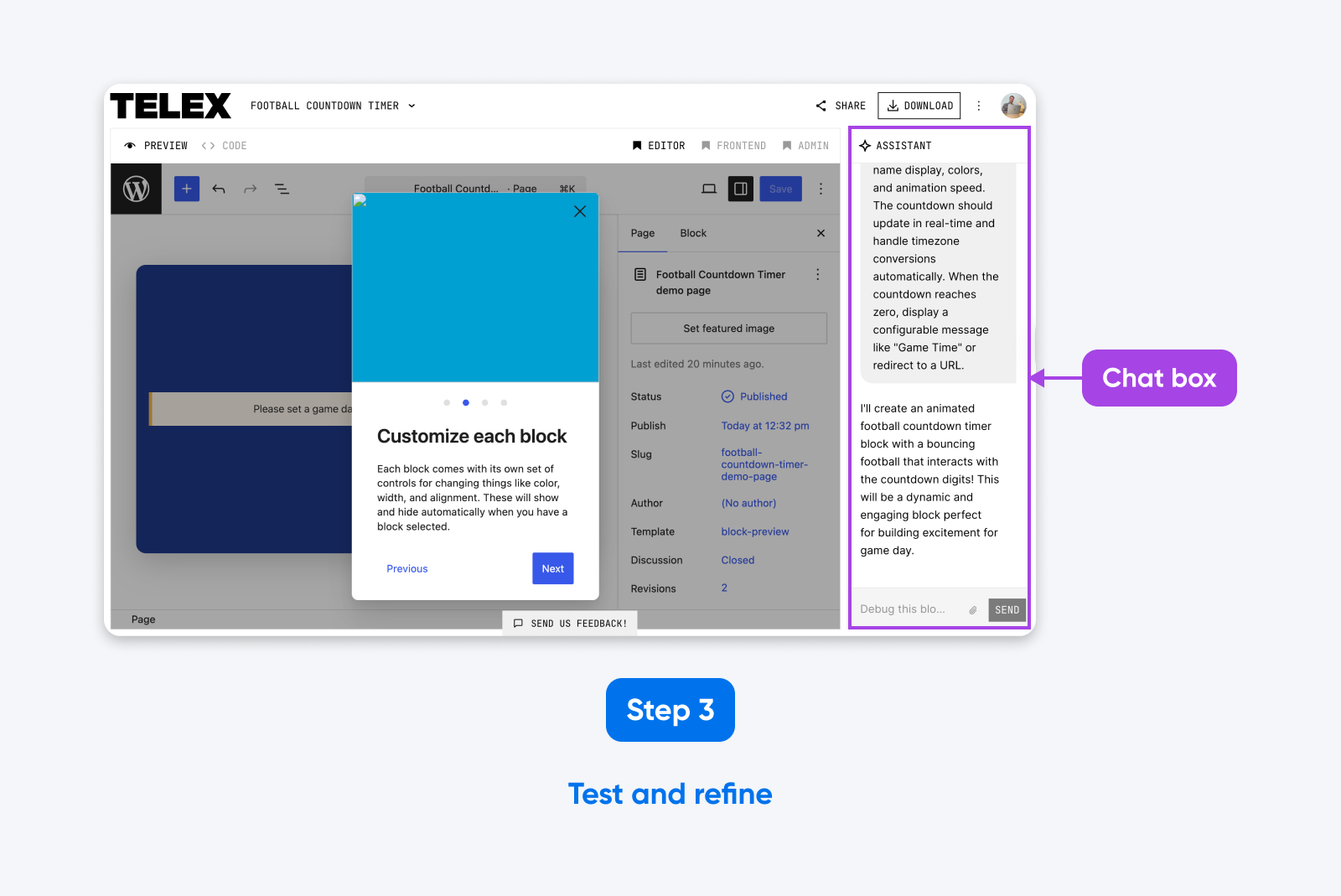
All through testing, we discovered the revisions a bit hit-and-miss. Nonetheless, persistence generally pays off — if the primary edit doesn’t work, attempt, attempt, attempt once more.
Arms-on With Telex: Constructing 5 Customized Blocks From Scratch
There’s solely a lot you possibly can study from a product launch weblog. So, we determined to place Telex via its paces ourselves.
Is it legit or simply one other breath within the AI hype bubble? Let’s discover out.
Undertaking 1: Animated Soccer Countdown Timer
Who loves soccer? For true followers, the subsequent gameday can’t come round quickly sufficient. If solely there have been a way of monitoring the time till kick-off…
Enter the soccer countdown timer.
The purpose of this block challenge was to create a enjoyable, animated clock that might show the times, hours, and minutes till the subsequent fixture. (Excellent for a fan weblog or the homepage of your flag soccer workforce…)
Our preliminary immediate was fairly easy:
Create a block that shows an animated countdown timer to a future date, set through the block settings. The timer ought to have days, hours, and minutes. Every time the minutes change, a soccer graphic ought to “fly” in from the left, bounce on the minutes counter, and proceed off to the proper, in a sensible ball flight.
We used the Improve Immediate choice so as to add a bit extra element, after which set Telex into motion. The instrument took round one minute to spin up the brand new block.
The primary go was respectable. Telex created a working countdown timer, with the block choices we requested. It even threw in a bonus setting — coloration selections for the timer.
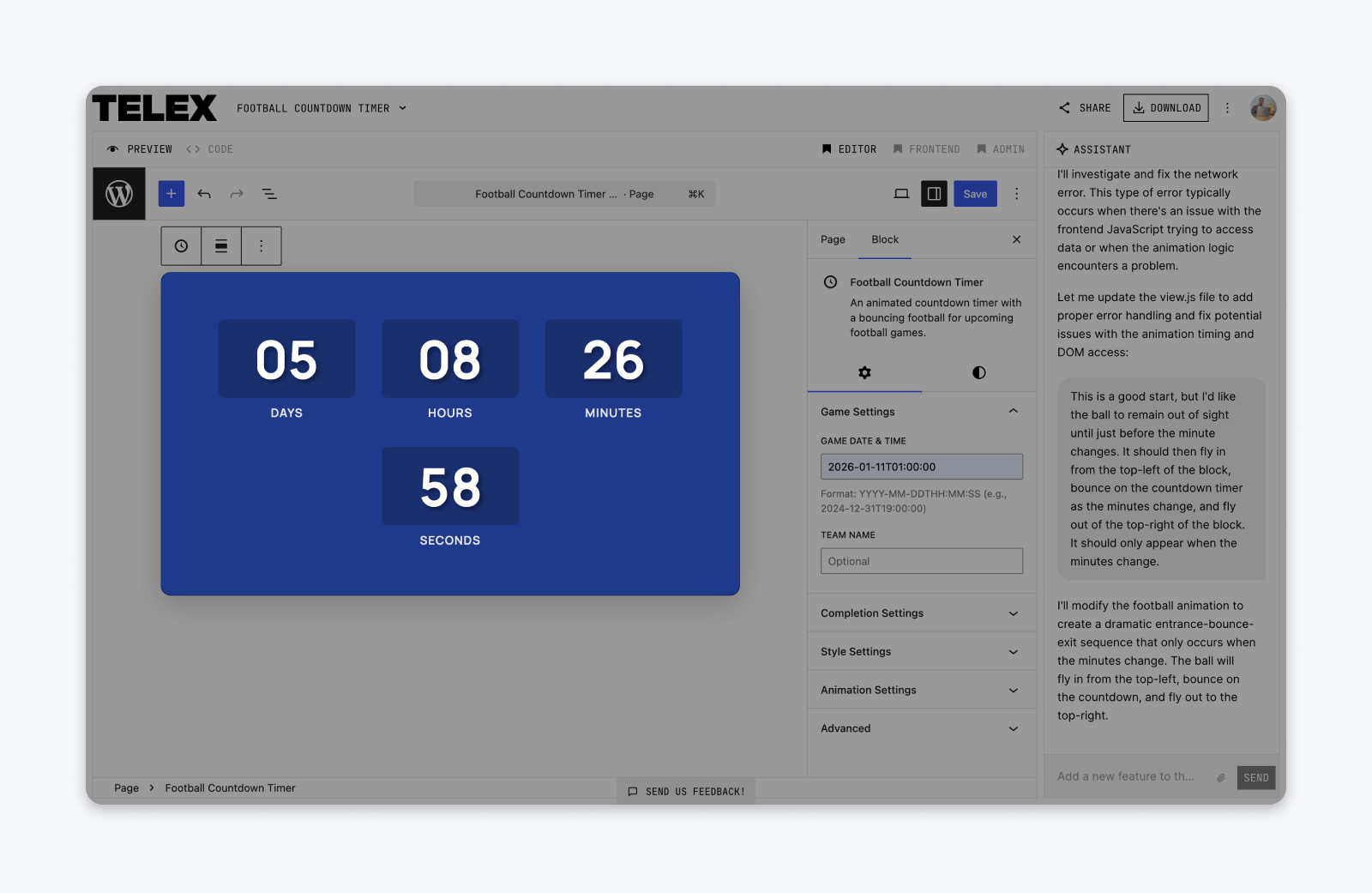
On the draw back, Telex didn’t fairly get the animation we needed. Somewhat than a soccer flying in each minute to alter the timer, we bought a relentless bouncing ball on the clock. Okay, however not precisely a landing.
We tried a number of totally different revision prompts to repair the problem. None of them labored absolutely. However no less than we had a working timer.
- Immediate enhancement: C+
- First go: B-
- Revisions: C-
Total grade: C+
Undertaking 2: Smartphone Measurement Comparability Device
Discover how smartphones appear to maintain getting greater?
To make the duty of discovering a pocketable gadget a bit simpler, we thought it could be helpful to create a measurement comparability instrument — simply so you possibly can see how totally different telephones measure up.
Right here’s the immediate we began with:
Make a block that enables customers to see a side-by-side comparability of the scale of two smartphones. The block ought to show two phone-shaped silhouettes on both sides: one from the entrance perspective, and one from the aspect view.
Every silhouette must be displayed on the similar ratio to actual life primarily based on the size given within the block settings. The block settings ought to embrace bins for top and width dimensions in millimeters, with the choice to alter to inches because the measurement.
Already a little bit of element in there, as you possibly can see (we tried to repeat the fashion of the instance immediate within the Telex launch weblog).
However the “Improve Immediate” characteristic prolonged the directions to a few paragraphs, itemizing each the precise controls wanted and the technical particulars (“Render the identical scaled silhouettes in a responsive container that maintains correct ratios throughout units”).
High marks right here.
With a picture hooked up exhibiting the same characteristic on an present web site, we set Telex to work. This construct took a bit longer — nearer to 2 minutes — however the output was actually good.
We bought precisely the structure and block choices we had been in search of. On the first try, we had a block that you may publish.
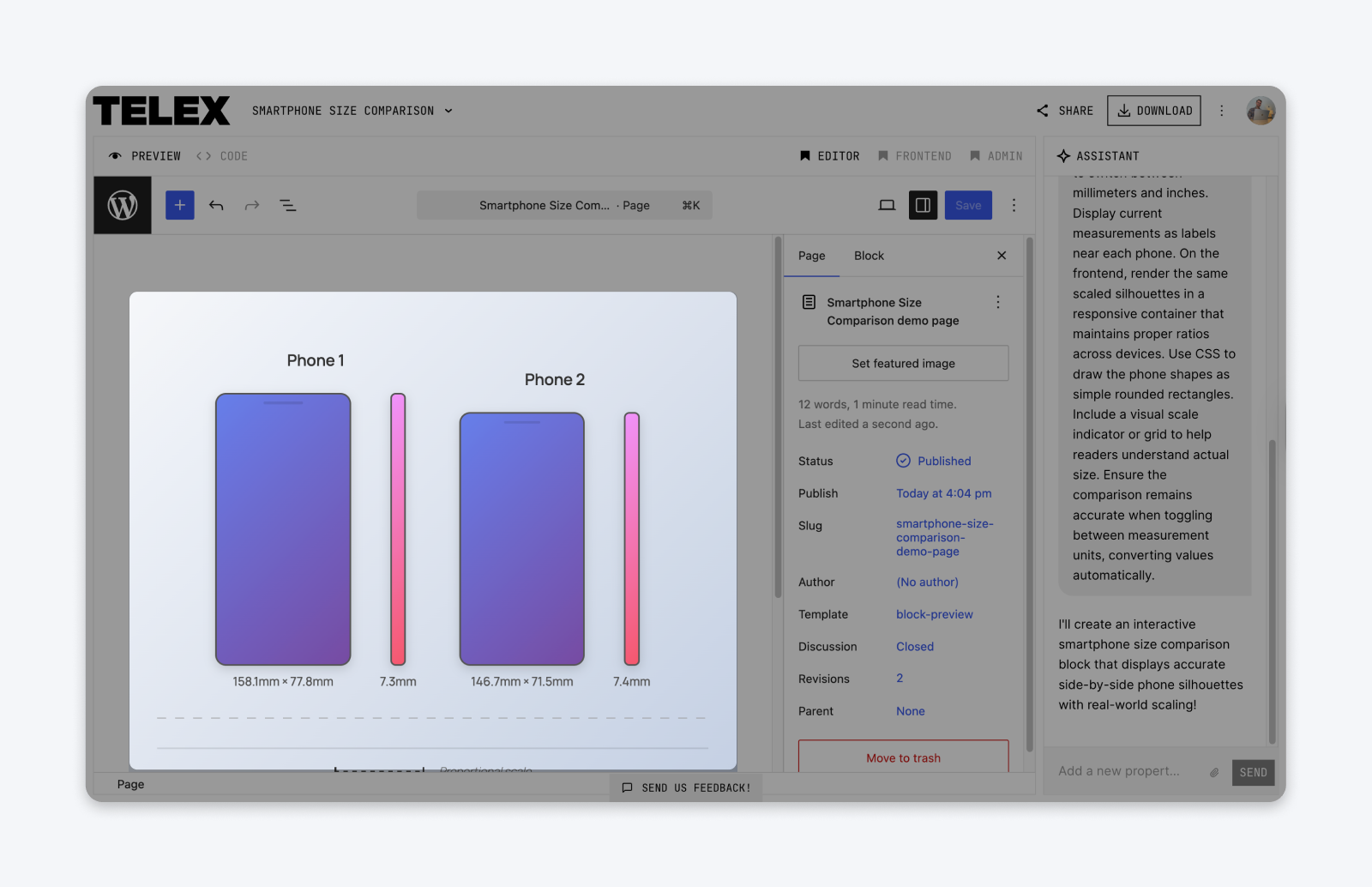
Simply to stretch Telex a bit, we requested the AI so as to add coloration choices and take away the dimensions from the block. It dealt with these revisions completely. Good work, Telex.
- Immediate enhancement: A+
- First go: A-
- Revisions: A+
Total grade: A+
Undertaking 3: Dynamic Pricing Calculator
Let’s attempt one thing a bit extra critical now. When you run a enterprise, you would possibly wish to permit prospects to see what they’ll pay primarily based on their wants.
That is what a dynamic pricing calculator makes doable: customers merely plug of their selections, and the block ought to spit out a value.
Right here’s our beginning immediate for the calculator:
I run an internet site design enterprise and need a pricing calculator block. The customer selects choices and sees the value replace in actual time. Choices can be: variety of pages (dropdown: 1–5, 6–10, 11–20), whether or not they want e-commerce (sure provides $500), whether or not they want search engine marketing setup (sure provides $300), and internet hosting plan (month-to-month $29 or yearly $299). Present the whole on the backside and have a “Request Quote” button that doesn’t really submit something, simply reveals a message saying we’ll be in contact.
That’s a reasonably complete immediate, if we do say so ourselves. Telex agreed; it solely made minor adjustments once we enhanced the immediate.
The output was spot on. Not tremendous fairly, however neat and absolutely practical. We significantly preferred that Telex added sliders to the block choices, making it straightforward to tweak the value of particular person line gadgets.
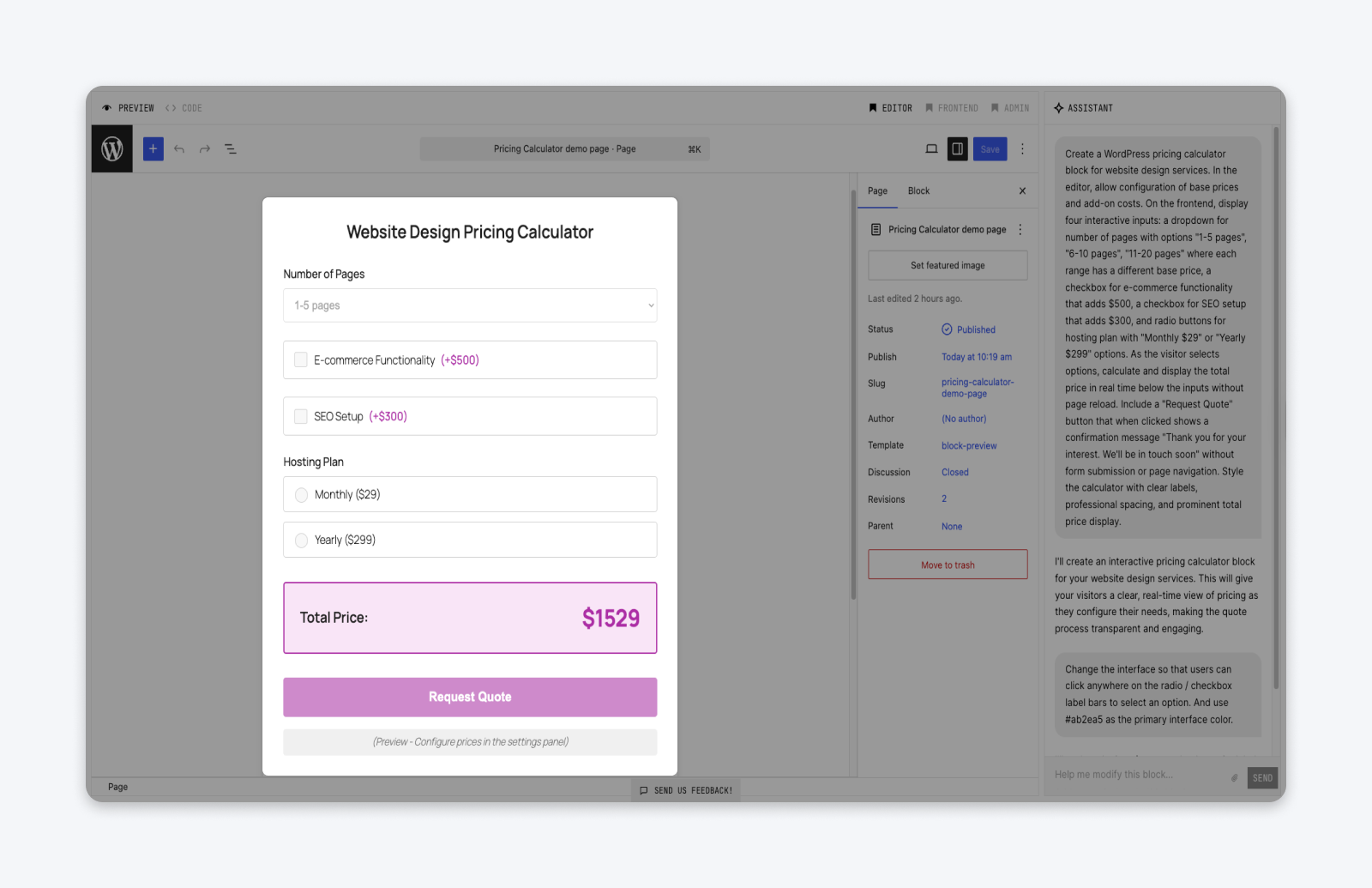
We requested for 2 minor revisions: make the choice labels selectable, and alter the primary coloration scheme to purple. And each changes had been accomplished completely inside 30 seconds.
All spherical, very spectacular stuff.
- Immediate enhancement: C+
- First go: A+
- Revisions: A+
Total grade: A+
Undertaking 4: Drag-and-Drop Film Rankings
If you wish to join with a cinephile, simply ask them to rank a group of flicks. On the spot dialog starter.
It really works on-line, too. That’s why most film bloggers commonly share polls. Looks like a great challenge for testing Telex, no?
We used a really “actual world” immediate this time. One thing that the common individual would possibly write, relatively than the work of an AI nerd:
Construct a block that lets guests rank a listing of things by dragging them into order. For instance, I’d checklist 5 motion pictures and ask individuals to rank them from favourite to least favourite. After they’re achieved rating, there must be a submit button, and it ought to present a thanks message. Within the editor, I wish to kind within the gadgets for the checklist and add a title/query on the prime.
Telex did an incredible job of enhancing these directions into one thing extra concrete and particular. The completed immediate detailed precisely how the block ought to work, together with descriptions of all of the frontend parts.
As soon as once more, Telex got here up with the products. The preliminary output is precisely what we had in thoughts, with editable labels, good spacing between the checklist gadgets, and a customized affirmation message.
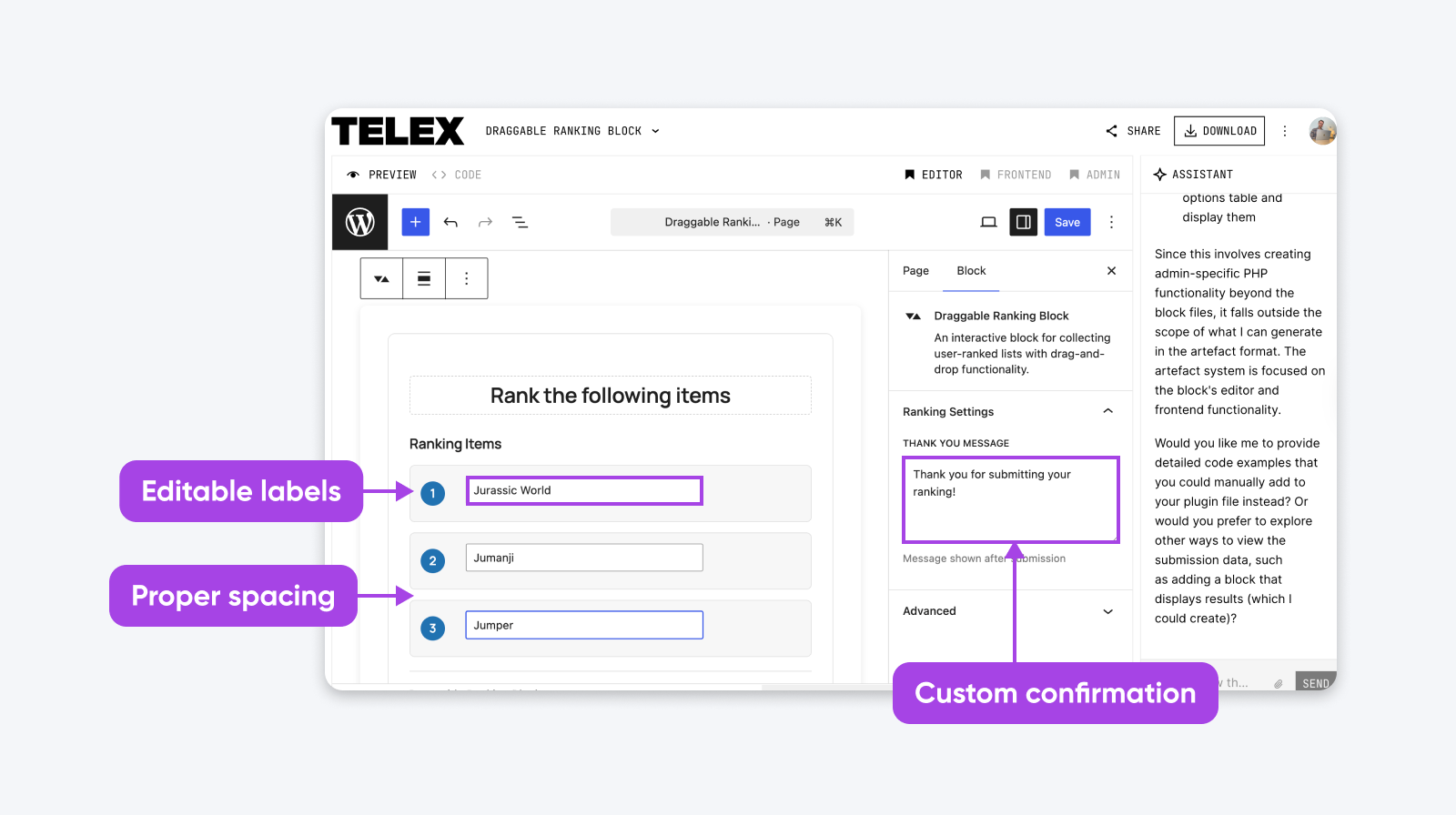
After all, customers will in all probability wish to know the way different individuals have voted. So, we requested Telex for a revision:
When customers submit the shape, show the commonest rankings from all submissions.
This clearly requires some approach to retailer submissions. Telex quickly figured this out, updating each the frontend and backend.
The issue? Telex didn’t fairly get the server-side code proper. Because of this, the block might observe the outcomes of every person, however didn’t maintain an total tally.
Simply to stretch Telex a bit additional, we requested for yet another addition — a brand new part to the admin space, with a dashboard for analyzing incoming votes. However the AI confirmed our suspicions: Telex can’t really tinker with something outdoors one particular block.
Whilst you might add this characteristic manually on prime of the block, it may be simpler to simply seize a ready-made plugin!
- Immediate enhancement: A-
- First go: A+
- Revisions: B-
Total grade: A-
Undertaking 5: Dwell Cryptocurrency Value Tracker
Proper, sufficient with the simple stuff. To actually check the bounds of Telex, we determined it was time to attempt one thing really formidable: a cryptocurrency value tracker, powered by stay market information.
To make this doable, we clearly wanted an information supply. We selected to work with the CoinMarketCap API, as a result of it gives a beneficiant free plan.
We then prompted Telex. Wouldn’t it be capable to construct round a third-party API? Our beginning directions:
Construct a block that reveals the present value of Bitcoin and Ethereum. It ought to replace routinely each jiffy and present whether or not the value has gone up or down because the final replace (perhaps a inexperienced or purple arrow). I’d like to have the ability to select which cryptocurrencies to show within the block settings. I will probably be utilizing an API key from CoinMarketCap, so embrace a block area for this key.
As you possibly can see, we left Telex to determine the small print. The “Improve Immediate” characteristic actually impressed us right here: the instrument expanded our immediate to a few paragraphs, including some bonus performance and punctiliously outlining the frontend.
Sadly, Telex couldn’t determine the API. We tried a number of rounds of debugging, however couldn’t get previous the errors. We even tried switching to a unique API supplier — however no luck.
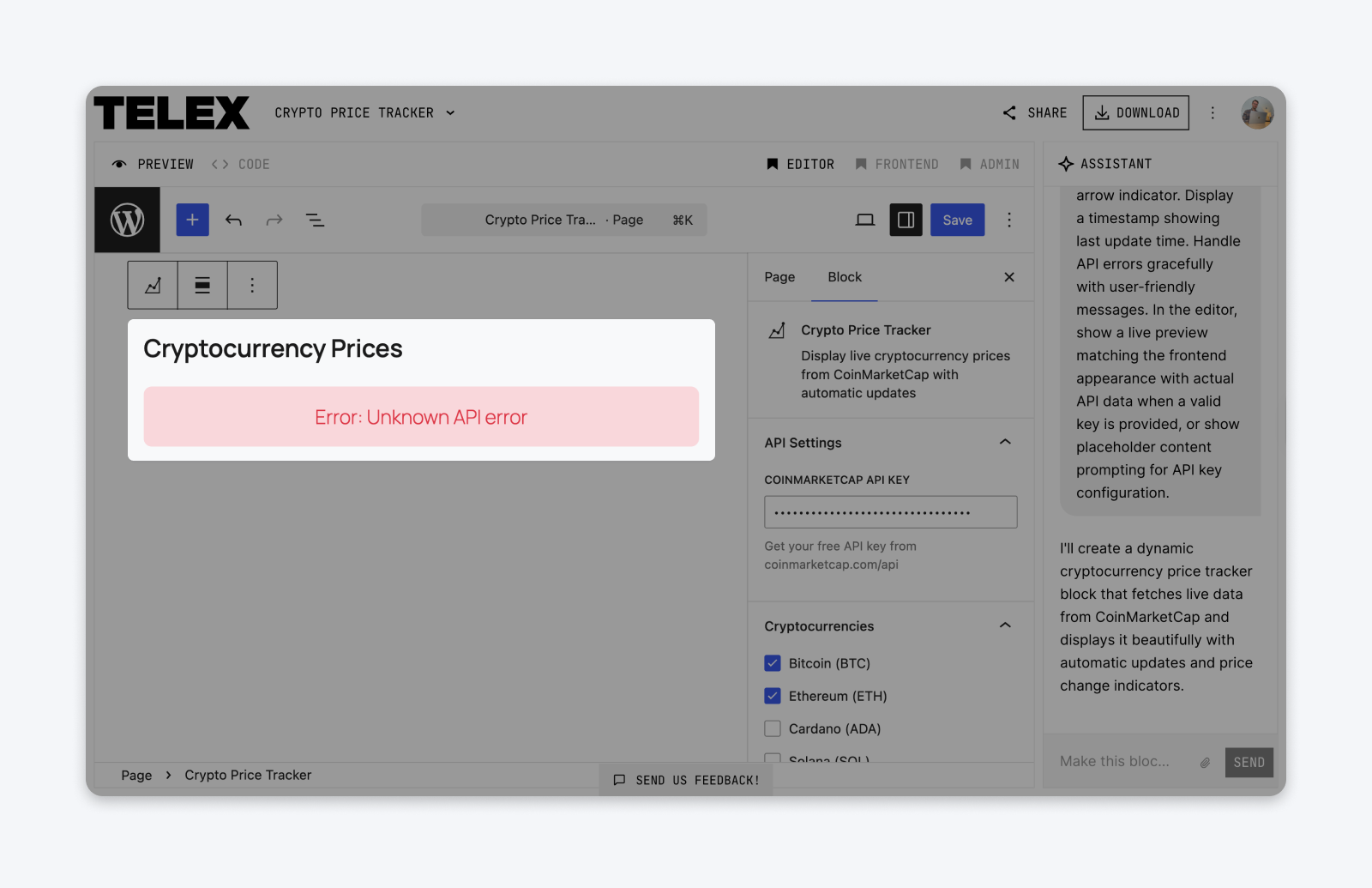
The one approach to rescue this challenge can be to go in and repair the code your self. Not a significant subject, however it reveals the AI isn’t excellent.
- Immediate enhancement: B+
- First go: C-
- Revisions: F
Total grade: D+
The Verdict: How Does Telex Carry out within the Actual World?
Trying again on our 5 tasks, it’s clear that Telex is genuinely helpful for anybody who owns, maintains, or builds web sites.
Whereas the outputs fluctuate in high quality, Telex can produce distinctive blocks from comparatively easy directions. You don’t should be an skilled WordPress developer to create customized blocks with this instrument. And it may construct these blocks sooner than any human.
Total, we had been actually impressed with Telex — it’s an incredible addition to the WordPress toolbox, and it’ll in all probability enhance over time.
That stated, we don’t assume Telex is kind of able to take over internet improvement simply but.
Why Telex Can’t Exchange Plugins (But)
For simplest tasks, Telex works completely. However as you ramp up the complexity, issues get a bit shaky.
As our checks revealed, Telex doesn’t at all times give you the products. It couldn’t fairly determine the soccer animation, and pulling API information from an out of doors supply proved a step too far. Complicated logic is one other weak spot.
Telex additionally tends to stay to tried-and-tested block layouts, and making superb changes to the design may be laborious work.
Then, there’s safety to contemplate. Whereas most plugin builders run checks on their code, Telex doesn’t care. If the block works, that’s job achieved.
Most necessary of all, there are issues Telex isn’t allowed to do:
- You’ll be able to’t add any new sections to your admin space.
- You’ll be able to’t add recordsdata aside from pictures to help the AI.
- You’ll be able to’t construct a block inside a block (though you possibly can join two separate blocks).
In abstract: Telex doesn’t substitute skilled WordPress builders — it’s not even shut, but.
So, When Ought to You Use Telex?
Proper now, we expect that Telex fills the hole between code snippets and highly effective plugins.
The AI permits you to transcend ready-made templates, so you possibly can add customized performance and design choices — however there are technical limitations.
Take Undertaking 1 (the countdown timer) for instance. The best manner so as to add a countdown to your web site is by discovering a ready-made template, and copy-pasting the code. Nonetheless, you won’t get a lot flexibility by way of design or performance.
With Telex, you possibly can insert your individual animation, add coloration choices, and resolve what occurs when the counter reaches zero. It’s nonetheless fast and straightforward, however you might have far more management.
However what for those who needed to add a whole season schedule through a WordPress admin web page and pull in stay scores on gameday? Properly then, you’re in all probability higher off utilizing a purpose-built plugin or writing customized code.
| Copy-Paste Code | Telex | Full Plugin/Customized Code |
| Fast and straightforward, however what you see is what you get. | Fast and versatile, with customized styling and settings you management. | Highly effective options, however extra to study and handle. |
Finally, we suggest attempting Telex for your self. We are able to’t wait to see what you construct with this spectacular new AI instrument!

Unbeatable WordPress Internet hosting
Dependable, lightning-fast internet hosting options particularly optimized for WordPress.
WordPress Telex FAQs
Nonetheless interested in WordPress’ new AI instrument? Listed here are the solutions you’re in search of!
Do you might want to be a developer to make use of WordPress Telex?
No, anybody can construct blocks with this instrument. The one caveat: it’s a good suggestion to evaluate and debug the code earlier than placing Telex blocks on an necessary web site. So, technical abilities are helpful in that sense.
Can you employ WordPress Telex offline?
Not in the mean time. It’s solely out there through the WordPress Playground. You’ll additionally want a WordPress.com account to entry the instrument.
Can you employ Telex-Made blocks on manufacturing web sites?
Sure, however with warning. WordPress stresses that Telex is an experimental instrument and that it would produce utter nonsense sometimes. So, be certain to test the code earlier than you go stay.
Which AI fashions does WordPress Telex use?
We don’t know precisely which AI applied sciences Telex makes use of. However the CEO of Automattic, Matt Mullenweg, has stated that the challenge was impressed by V0 and Lovable: two AI platforms that permit you to construct apps via prompts.
These related apps use a mixture of superior fashions to interpret prompts and write code. Telex in all probability does one thing related.
Did you take pleasure in this text?